

Looker Conversational Analytics Services
Make data part of everyday conversations
We help enterprises deploy conversational BI solutions, turning analytics into a chat-with-your-data experience.
By leveraging Looker’s semantic layer and AI-powered analytics with Google Gemini, we make trusted answers available to every user, eliminating the need for a BI specialist for every query.
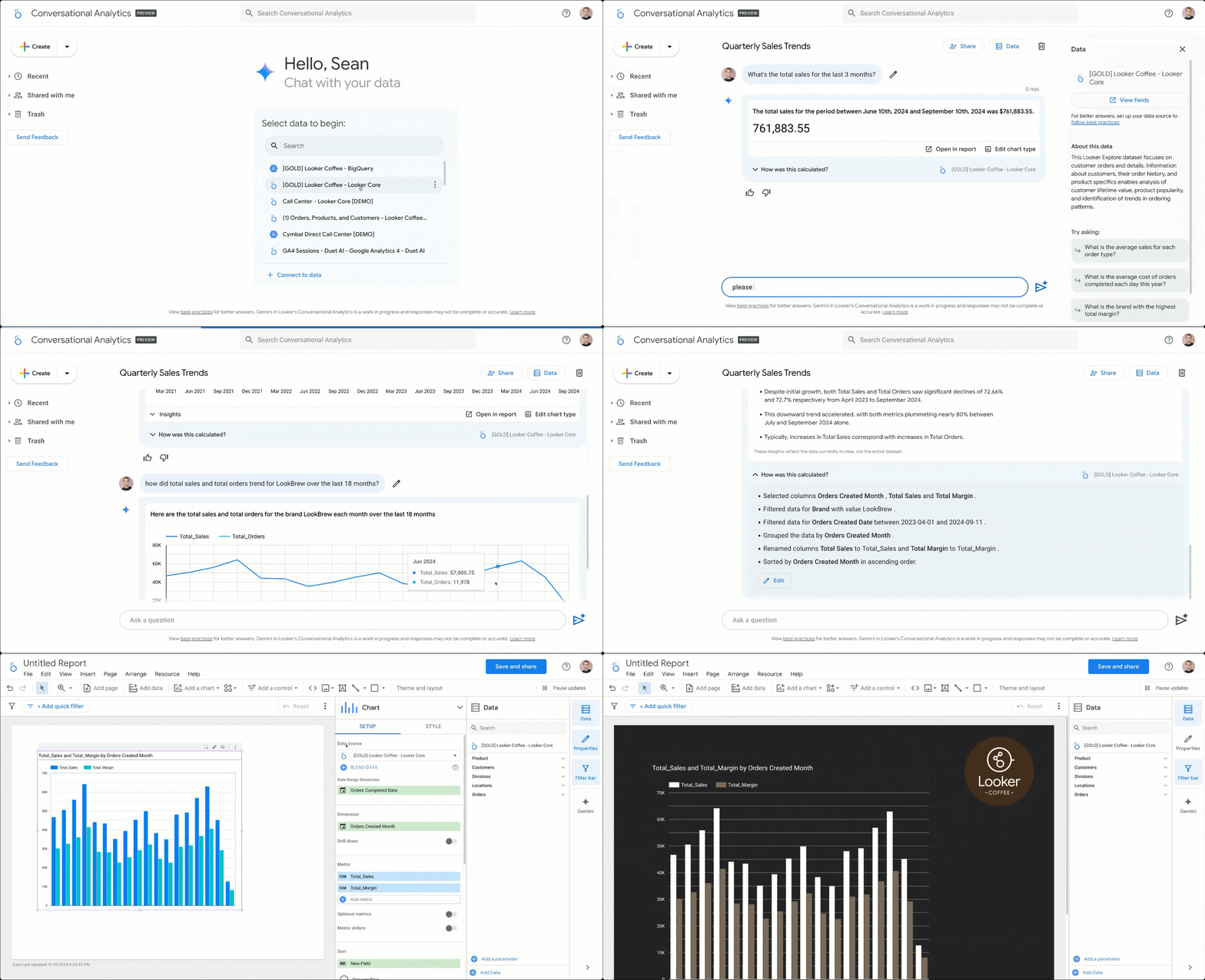
Making Looker accessible through natural language queries
Turn your data foundation into an everyday decision layer
We enable instant, governed access to data across the organization, built on existing infrastructure and designed to work without disruption.
A question such as “What was revenue by region last quarter?” produces an instant, governed answer.

Visuals and tables are generated automatically, along with clear explanations.

Follow-up questions refine results in context, making exploration intuitive.

Business-friendly analytics, grounded in governed data.
1
Natural language Query
Users ask questions in natural language without needing SQL skills.
4
Automated visualizations
Charts and tables are created automatically to illustrate insights.
2
Governed Results
Results are always governed by LookML, so KPIs remain consistent.
3
Iterative exploration
Conversations build context, remembering prior queries and refining results.
5
Flexible access
Access is flexible - within Looker, embedded in apps, or surfaced in chat tools.
Your path to smarter data conversations
We offer flexible deployment paths, from foundational Q&A automation to advanced, multi-agent analytical workflows.
Foundational Conversational BI
A focused, 3-phase engagement delivering direct "Talk to Data" Q&A capabilities based on existing Looker models for rapid adoption.
PHASE I
Semantic Discovery
Understand business needs and curate Looker models for high-impact use cases.
PHASE II
Agent Tuning & Testing
Develop, tune, and test the conversational agent against real-world user queries.
PHASE III
Launch & Adoption
Pilot rollout, user training, and establishing a feedback loop for continuous improvement.
Advanced Agentic Workflows
A four-stage framework for conversational AI analytics, enabling proactive and multi-step analysis on top of Looker,
with governed integrations into external systems.
1
Workflow
Mapping
Define and detail the high-value, multi-step analytical processes to automate.
2
Architecture
Blueprint
Identify required agents, data foundation, and map the chain of reasoning.
3
Multi-Agent Development
Develop, integrate, and orchestrate agents using Conversational Analytics APIs.
4
Governance
& Hand-off
Validate results, establish oversight, and deliver training for solution ownership.
Measurable Outcomes with Conversational AI for Businesses
Higher Adoption
Empower every team member, not just analysts, to access
and use data daily.
Faster Insights
Reduce time-to-insight from hours or days (waiting for reports) to seconds (via chat).
Reduced BI Backlog
Free up your core BI team from generating ad hoc reports by enabling user self-service.
Trusted Results
Ensure data consistency because all answers originate from Looker's governed semantic layer.
Enterprise Services Firm
Sales teams use conversational BI to forecast pipeline and assess regional performance instantly.
Retail & E-commerce
Teams monitor campaigns and promotions in real time with conversational analytics.
Hi-Tech / SaaS
Customer success teams rely on AI-driven analytics in Looker to answer client questions instantly.
Working with SquareShift
We build and maintain conversational analytics for business users on top of Looker, including full support for semantic layer modeling, governance controls, and interface integration.
Our teams work across industries where data accuracy and access need to scale together. That includes Looker migrations, platform implementations, and long-term support for enterprise analytics environments.
Whether you have an existing Looker setup or are starting fresh, we can scope the work, align it to your internal structure, and plan a rollout that doesn’t add pressure to your teams.
.png)
Frequently asked questions
- 01
- 02
- 03
- 04
- 05
- 06