
Progressive Web Apps (PWAs) deliver app-like performance within the browser. They combine web reach with mobile capabilities. This structure improves load speed, responsiveness, and offline reliability. This article breaks down the architectural elements that drive these results for developers and users.
Service Workers
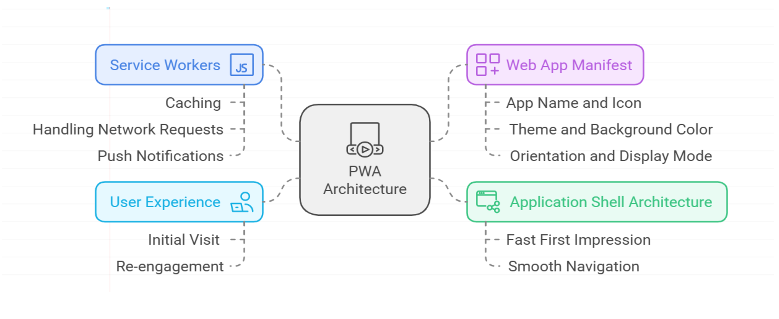
The service worker is a foundational PWA component. It is a JavaScript file that runs in the background. It manages caching and offline logic. This component enables offline access and reduces load times.
Service workers operate through three core functions:
- Offline Caching Service workers store assets, including images, text, and data, in local storage. This function allows users to access previously loaded content without an internet connection.
- Network Request Management When connected, the service worker evaluates each request. It selects the optimal source, server or cache, to minimize load times.
- Push Notifications Service workers enable push notifications. This feature maintains user engagement by delivering updates when the application is inactive.
By intercepting network requests, service workers provide a reliable, offline-capable experience. This capability distinguishes progressive web applications from traditional websites.
Application Shell Architecture for Immediate Load Times
PWA performance depends on load speed. Application shell architecture enables near-instant initialization.
The application shell consists of static structural components, including the navigation bar, header, footer, and main layout. This structure is cached for rapid initial rendering. The architecture functions as follows:
- Immediate Interactivity: The core user interface renders before full content loads. Users can interact with the structure while data retrieves in the background.
- Efficient Navigation: With the shell cached, subsequent view transitions execute quickly without redundant network requests.
Caching the app shell ensures consistent initial loading times. The application loads immediately upon subsequent visits.
3. Achieve Native Appearance: Web App Manifest
The web app manifest triggers the installation prompt. It defines the visual and functional attributes of the application.
The web app manifest is a JSON file. It configures the application appearance and behavior on the user device. Key fields include:
- App Name and Icon: These elements appear on the home screen. They provide a native application interface.
- Theme and Background Color: These colors unify the app and the device home screen.
- Orientation and Display Mode: PWAs can run in full screen, hide the browser interface, and lock orientation to landscape or portrait.
These elements integrate PWAs into the device environment. This reduces the difference between websites and mobile apps.
4. PWAs and the User Experience
PWAs draw attention because they deliver a reliable, high-performance experience. The user journey includes:
- Initial Visit: The user experiences fast load times and smooth interaction. They add the app to their home screen. They continue use during offline periods.
- Re-engagement: Cached content and push notifications maintain user engagement and information flow.
Benefits extend beyond speed. They include accessibility, retention, and usability. For businesses, these factors increase engagement and user loyalty.
PWA Architecture
Current Use Cases and Examples
Windows Store Distribution
Microsoft supports PWA publication on the Windows App Store. Tools such as PWABuilder package PWAs and add capabilities. Developers integrate AI features. These include speech-to-text and real-time translation. These integrations use Microsoft AI tools on Windows devices.
Google Play and Apple App Store Distribution
PWAs now publish directly on the Google Play Store and Apple App Store. This distribution method matches native app reach. Businesses access larger audiences. They maintain PWA efficiency and flexibility.
Augmented Reality and Immersive Experiences
PWAs now support augmented reality (AR). Retail and real estate firms use PWAs for virtual try-ons and property tours. These features run in the browser. Users do not need to download large native apps.
AI-Enabled PWAs
Developers integrate AI to personalize user experiences. Key applications include:
- ■Recommendation engines in e-commerce PWAs.
- ■AI-driven chatbots for customer support.
PWA Business Value: Cost Efficiency and Return on Investment
PWAs offer high cost-effectiveness. Native apps require separate development for iOS and Android. PWAs use a single codebase for all platforms.
Development Cost Analysis:
- Single codebase: Write code once. Deploy to multiple platforms. This reduces development costs.
- Reduced maintenance: Push updates directly to users. App store approvals are not required.
- Cross-platform support: PWAs run on mobile, desktop, and tablet devices. This provides a consistent user experience.
This improves return on investment (ROI). Organizations reach larger audiences with fewer resources.
Beyond Architecture: PWA Impact on User Experience
PWAs gain traction because they deliver a reliable, high-performance user experience.
User Journey on a PWA:
- Initial Visit: Users observe fast load times and smooth interactions. They add the app to the home screen. The app functions offline.
- Re-engagement: Cached content and push notifications keep users engaged and informed.
Benefits include speed, accessibility, retention, and usability. These factors increase user engagement and loyalty.
PWABuilder: Streamlined PWA Development
PWABuilder is an open-source tool that simplifies PWA construction and packaging. It provides:
- One-Click Conversion: Developers add a manifest and service worker to convert existing websites into PWAs.
- Cross-Platform Deployment: PWABuilder publishes PWAs to Google Play and the Windows Store with low effort.
- PWABuilder integrates AI tools. These tools support real-time language translation and speech recognition. This feature improves the user experience.
PWABuilder simplifies PWA deployment. It delivers PWA benefits to a broad audience. It removes the complexity of traditional app development.
PWAs: The Standard Architecture for Web Applications
PWAs combine web accessibility with native-app speed. They avoid the overhead of app store distribution. They support cross-platform delivery. A single PWA codebase runs on desktops, mobile devices, and tablets without modification.
Major organizations, including Twitter, Starbucks, and Pinterest, deploy PWAs. This adoption confirms PWA architecture as a sustainable standard. PWAs deliver fast load times and offline access. They provide a consistent, app-like interface. These capabilities optimize the user experience.