
Deliver reliable user experiences through structured code. The Model-View-ViewModel (MVVM) pattern manages data flow and UI interactions. It supports mobile, desktop, and web platforms. This approach separates data from presentation logic, simplifying testing and maintenance.
Define the Model-View-ViewModel (MVVM) Pattern
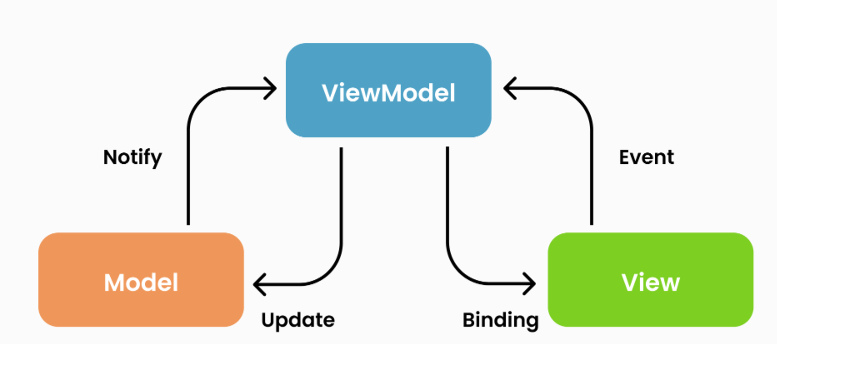
MVVM divides the codebase into three components: Model, View, and ViewModel. This separation creates a clear structure. It reduces dependencies between layers. The pattern facilitates independent testing and smooth updates.
- Model – Stores and manages application data. Handles logic for retrieving, saving, and processing data from APIs, databases, or external sources.
- View – Defines the user interface. Displays data to the user and captures input, such as button clicks or form entries. Functions as the presentation layer.
- ViewModel – Connects the Model and View. Updates the View with new data from the Model and translates user actions into Model data changes. Maintains application state to ensure UI elements display current data.
The MVVM pattern separates the Model and View. The components communicate only through the ViewModel. Data changes update the View automatically. UI changes do not alter the core data structure.
MVVM Benefits: Drivers for Continued Developer Adoption
MVVM offers key benefits for complex, interactive applications:
1. Two-Way Data Binding Supports Dynamic Interfaces
MVVM uses two-way data binding.
- Model changes update the UI immediately.
- Users see real-time data without manual refresh.
- Suitable for chat, live sports, and stock tracking apps.
2. Separation of Concerns Improves Testability
MVVM separates business logic from the UI.
- Developers test ViewModels independently.
- Fewer UI defects occur.
- Defined layer responsibilities prevent cascading issues.
3. Modularity and Reusability
MVVM supports code and component reuse. This design suits applications that scale over time. Views decouple from Models. Change the UI without altering data handling. Change data handling without altering the UI. This structure suits rapid development and frequent updates.
4. Maintainability
MVVM simplifies issue tracking, code refactoring, and feature addition. Responsibilities divide clearly. Update the data layer (Model) without touching the UI (View). This separation of concerns supports long-term maintenance as the application grows.
MVVM Architecture:
MVVM Applications in Production Systems
The following use cases demonstrate how MVVM supports complex data binding and state management:
Mobile Applications Using Xamarin and SwiftUI
MVVM supports real-time data updates and cross-platform development in Xamarin and SwiftUI. This pattern applies to mobile apps requiring dynamic interface changes, such as fitness trackers displaying live workout metrics or travel platforms refreshing flight status information.
Web Development With Angular and Vue.js
Angular and Vue apply MVVM principles via data binding and state management libraries such as RxJS or Vuex. This structure manages complex state interactions in web applications. For example, in e-commerce sites, shopping cart data updates instantly when users add items.
Structural Decomposition: How MVVM Reduces System Complexity
The following example illustrates an MVVM structure for an e-commerce application that tracks orders and displays user reviews:
- Model: Stores product details, order status, and reviews. Communicates with external APIs or databases to retrieve and update data.
- View: Displays product images and descriptions. Enables users to write reviews or track orders. Serves as the visible interface for user interaction.
- ViewModel: The ViewModel processes user commands and retrieves data to update the View. For example, when a user submits a review, the ViewModel validates the input and sends it to the Model. The Model updates the data, and the ViewModel updates the View to display the new review.
This structure ensures the layers operate independently. The application remains fast, responsive, and easy to test or update. This removes complex code that slows development.
MVVM Implementation: A Practical Analogy
Consider a news website that delivers live updates. The MVVM structure functions as follows:
- Model: The Model stores all news articles, breaking news alerts, and video footage. It functions like a newsroom database.
- View: The public interface that displays articles and breaking news to users.
- ViewModel: The layer that selects and organizes content from the newsroom. It presents current stories to the public, hiding backend logic.
The ViewModel updates the View with current data from the Model. This ensures users receive accurate information efficiently.
MVVM vs. MVC: Selecting the Appropriate Design Pattern
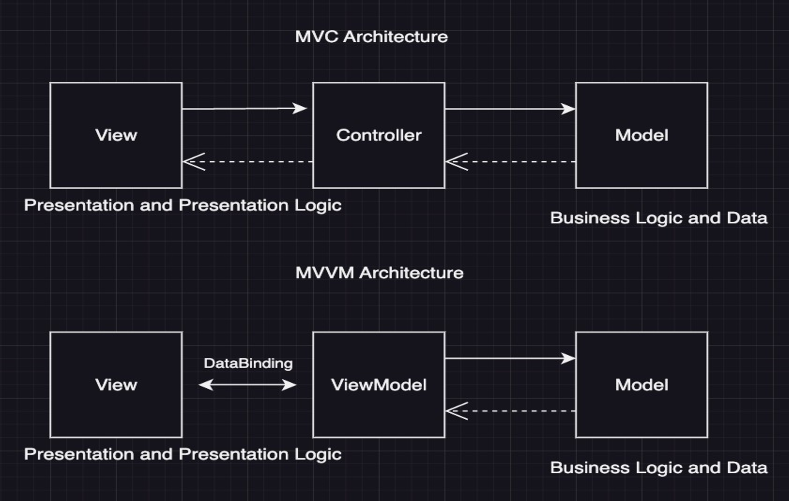
MVC and MVVM share common elements. The following points distinguish the two patterns:
- MVC: Suits simple apps. The controller manages user interactions. This fits traditional web apps.
- MVVM: Suits complex, interactive UIs with two-way data binding. The ViewModel manages UI logic. This improves maintainability and testing. This fits desktop and mobile interfaces.
Choose MVVM for apps with constant data updates and complex UI components. Choose MVC for simple applications.
Tools and Frameworks That Support MVVM
The following tools support MVVM natively. This simplifies implementation:
- Xamarin – Cross-platform framework that enables MVVM use on iOS and Android.
- SwiftUI – Apple framework that applies MVVM through data binding for iOS.
- Vue.js – Web framework that uses reactivity and state management to support MVVM-like workflows.