

Our previous article, "The Future of Data Access: Google AgentSpace and Expanding Third-Party Connections," addressed data connectivity. It covered integration of platforms such as Jira, SharePoint, and Workday. The system preserves access controls and enables AI-driven search of enterprise data. Connectors and actions provide only foundational connectivity. Custom AI Agents deliver greater operational value. These intelligent, modular components orchestrate workflows, process complex prompts, and execute real-time decisions.
This guide provides a blueprint for building, customizing, and integrating Custom AI Agents within Google AgentSpace. It targets developers and AI product leaders. You will learn how to extend organizational AI capabilities using a practical framework. You do not need to develop from scratch.
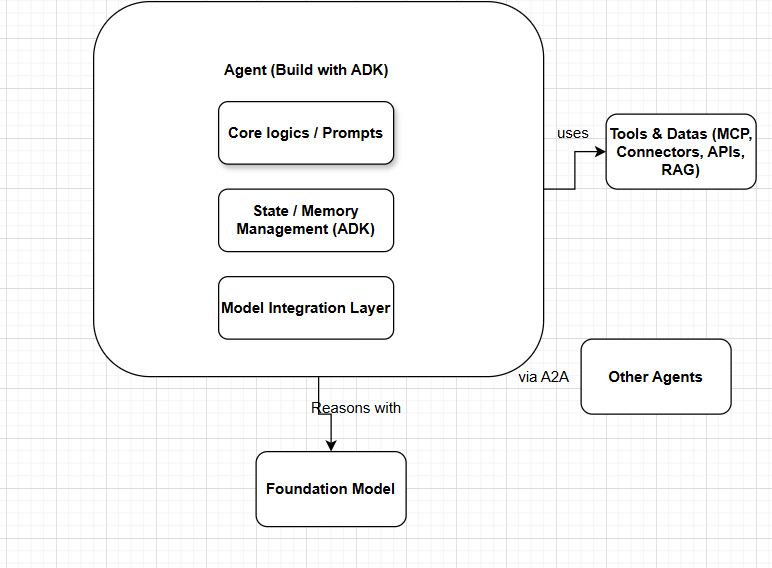
A custom AI agent in Google AgentSpace is an intelligent, modular component that orchestrates workflows, processes complex prompts and executes real-time decisions. It adds reasoning, context and decision-making to connectors, which retrieve data, and actions, which execute tasks. The following sections detail the implementation process.
Custom AI Agents: Essential for Enterprise Intelligence
Connectors provide data. Actions execute tasks. Custom AI agents add reasoning, context, and decision-making. These agents embed intelligence into workflows. Employees access enterprise systems using natural language.
Building custom agents aligns AI with business logic. Use cases include:
- Processing HR requests
- Automating DevOps tasks
- Answering queries from internal data
Benefits of Custom AI Agents
- Personalized Workflows: Define processes that match your specific business requirements.
- Contextual Awareness: Agents process current, relevant data.
- Operational Efficiency: Automate complex tasks beyond prebuilt connectors.
- Adaptive Architecture: Agents adjust to changing data, platforms, and goals.
Agent Development Kit (ADK) for Custom AI Agents: Build, Interact, Evaluate, Deploy
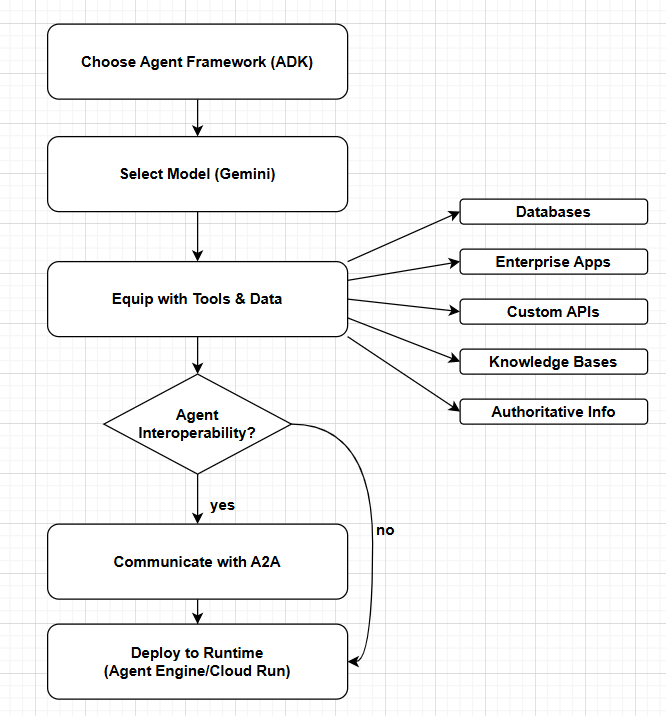
The Agent Development Kit (ADK) manages the full lifecycle of Custom AI Agents:
- Design multi-agent systems with hierarchical, modular structures.
- Access Gemini, Gemma, or other foundation models via Vertex AI Model Garden or LiteLLM providers such as Anthropic, Meta, or Mistral AI.
- Equip agents with pre-built tools, Model Context Protocol (MCP) tools, or LangChain and LlamaIndex integrations.
- Support multimodal, real-time conversations using bidirectional audio and video streaming.
- Select predictable workflows (Sequential, Parallel, Loop agents) or dynamic LLM-based routing (LLM Agent transfer).
- Integrated Development: Build using CLI or Web UI. Debug via event and state inspection.
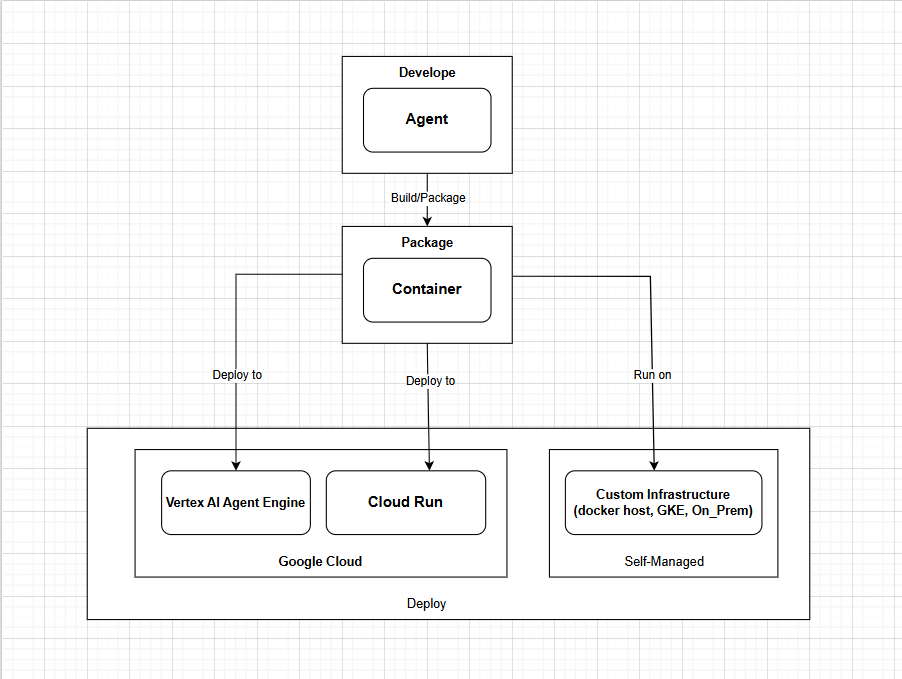
- Evaluation and Deployment: Assess agent performance. Deploy to Vertex AI Agent Engine or Cloud Run.
AgentSpace Ecosystem: Operational Context for Custom Agents
Map Custom AI Agents within the Google AgentSpace environment before development.
Orchestrator: Routes prompts to the appropriate agent or system.
Connectors: Retrieve data from third-party platforms.
Actions: Perform tasks through natural language.
Agents: Analyze data and provide intelligent responses.
Benefits of Google AgentSpace for Custom AI Agents
- Enterprise Security: Enforces data residency and role-based access control.
- Unified access. Agents connect to existing tools and workflows.
- Interoperability. Use the Agent2Agent (A2A) protocol to connect agents across platforms.
Select the Right Model to Drive Your Agents
Each agent needs a model to process tasks. Google Cloud offers several options.
- Gemini models. Use advanced multimodal models like Gemini 2.5 Pro for complex reasoning and long-context tasks.
- Gemma models: Lightweight models from open Gemini research. Suitable for efficient or customized tasks.
- LiteLLM Integration: Add models from providers such as Anthropic, AI21 Labs, or Mistral AI.
Tip: Align agent complexity and resource needs with the model. Use Gemini for deep reasoning. Use Gemma for speed or local deployment. Use third-party models for specialized tasks.
Building Robust Custom AI Workflows
Effective agents drive entire workflows. Custom AI Agents support:
- Sequence tasks. Configure agents to execute multi-step processes in order.
- Execute in parallel. Run agents concurrently to increase efficiency. For example, process HR and IT requests at the same time.
- Route dynamically. Enable agents to delegate tasks using LLM-based logic.
Workflow Example: Onboarding Agent
- Collect user data.
- Creates accounts in IT systems.
- Initiates HR documentation.
- Schedules orientation meetings.
Specialized agents execute each step, demonstrating true AI agent orchestration.
Enable multi-agent collaboration and interoperability
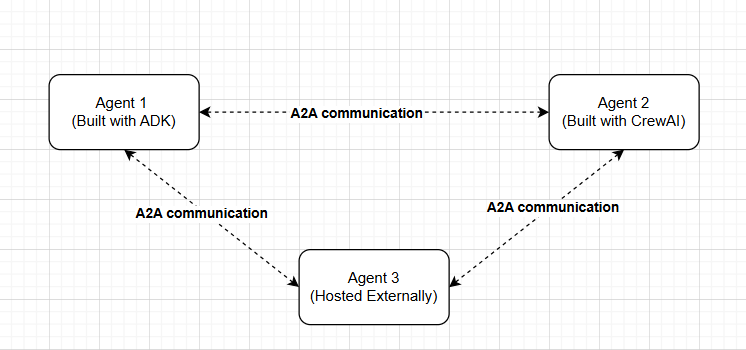
Agent2Agent (A2A) protocol standardizes communication between agents in ADK, CrewAI, LangGraph, and other frameworks. Google and 50+ partners back A2A. It prevents vendor lock-in by allowing agents to:
- Discover capabilities.
- Negotiate workflows.
- Coordinate tasks securely across frameworks.
If you use only ADK, skip A2A. Use built-in methods such as shared session states or the transfer_to_agent API.
Deploy Custom AI Agents: Move from Development to Production
Custom AI agents require a secure, scalable runtime.
- Agent Engine (Vertex AI): A fully managed runtime. It handles infrastructure, memory, and session state.
- Cloud Run: Deploy containerized agents. It provides auto-scaling and integrated security.
- Google Kubernetes Engine (GKE): Deploy complex, multi-container agents. It offers fine-grained control.
Regardless of the selected runtime, verify the following:
- Implement proper authentication using OAuth 2.0 or IAM service accounts.
- Register endpoints securely through the AgentSpace manifest.
- Enable monitoring via integrated analytics to support continuous improvement.
Applications of Custom AI Agents
1. Financial Services Agent
- Processes loan applications.
- Flags compliance risks.
- Updates records securely.
2. Retail Inventory Manager
- Track warehouse stock levels.
- Predict stock shortages.
- Place automated restocking orders.
3. Healthcare Assistant
- Summarize patient records.
- Books appointments.
- Tracks prescription refills.
These examples demonstrate how Custom AI Agents increase speed, accuracy, and user experience while maintaining security and compliance.
Related reading: enterprise data storage and retrieval with Google AgentSpace and building a smart Elasticsearch agent with LangGraph and Gemini.
API Connectivity: Flexible Options for Custom Applications
Google AgentSpace supports connecting agents to Dialogflow for hybrid generative and deterministic conversations. Use API integrations to connect agents with any system. This enables advanced workflows, such as:
- Resolve banking fraud disputes.
- Manage HR cases automatically.
- Execute intelligent CRM follow-ups.
Open A2A support enables integration of agents built on LangChain, Agent Development Kit, or third-party frameworks. This ensures enterprise AI integration without loss of flexibility or control.
Measure and Improve Agent Performance
Google Cloud Console provides AgentSpace analytics:
- Search analytics: Track query patterns and satisfaction rates.
- Real-time feedback: Capture user ratings for immediate quality metrics.
- Detailed analysis: Segment data by query type, user group, or source.
Apply these insights to:
- Identify low-performing workflows.
- Adjust boost and bury rules to improve search relevance.
- Update tools and prompts for Custom AI Agents.
Build Intelligent, Adaptive Enterprises with Custom AI Agents
Building Custom AI Agents in Google AgentSpace transforms how teams use enterprise systems. These agents automate repetitive tasks, provide context-aware support, and allow employees to focus on innovation.
AgentSpace provides a modular architecture. It includes a robust Agent Development Kit (ADK). It supports open interoperability via the Agent2Agent protocol. This allows you to deploy agents tailored to specific business challenges.
Determine the function of your first Custom AI Agent. Build the agent now. Extend enterprise intelligence to operational edges.
Review operational workflows
Frequently asked questions
What are Custom AI Agents in Google AgentSpace?
How do they differ from connectors or actions? Custom AI Agents add reasoning, context, and decision-making to workflows. Connectors retrieve data. Actions execute tasks. AI agents interpret intent. They combine data sources. They orchestrate next steps. This enables end-to-end enterprise automation.
How does the Agent Development Kit (ADK) simplify building enterprise-ready AI agents?
The ADK manages the full agent lifecycle. It covers local development, evaluation, and deployment. It supports multi-agent architectures. It offers flexible orchestration patterns. It allows model selection from Gemini, Gemma, and third-party LLMs. Teams build scalable and reusable agents without new infrastructure.
When should enterprises use multi-agent workflows instead of a single AI agent?
Use multi-agent workflows for tasks requiring specialization, parallel execution, or conditional decision-making. Assign focused agents to HR, IT, compliance, or analytics tasks. This improves accuracy and scalability. It benefits complex onboarding, financial processing, and operational automation.
How does Google AgentSpace ensure security and governance for Custom AI Agents?
AgentSpace enforces role-based access controls. It ensures data residency compliance. It manages secure identity. Custom AI Agents inherit permissions from connected systems. Users access only authorized data. Vertex AI Agent Engine provides monitored, auditable, and production-ready deployment.
How can SquareShift help enterprises build Custom AI Agents in Google AgentSpace?
SquareShift provides design, development, and deployment services. It guides agent architecture, model selection, and workflow orchestration. It integrates with existing systems. This ensures scalable, secure, and compliant AI automation.
Can SquareShift assist with multi-agent orchestration and complex workflows?
Yes. SquareShift implements multi-agent workflows using Google AgentSpace and the ADK. It designs sequential, parallel, and dynamic routing architectures. Specialized agents collaborate efficiently. This improves operational efficiency and reduces errors. It automates complex HR, IT, and financial processes.
What models can Custom AI Agents use in Google AgentSpace?
Each agent needs a model. Google Cloud offers Gemini models such as Gemini 2.5 Pro for complex reasoning and long-context tasks, and Gemma models for efficient or customized tasks. LiteLLM integration adds models from providers such as Anthropic, AI21 Labs or Mistral AI.
Where can you deploy Custom AI Agents built with the Agent Development Kit?
The guide lists three runtimes. Vertex AI Agent Engine is a fully managed runtime that handles infrastructure, memory and session state. Cloud Run deploys containerized agents with auto-scaling and integrated security. Google Kubernetes Engine suits complex, multi-container agents that need fine-grained control.
What is the Agent2Agent (A2A) protocol?
The Agent2Agent protocol standardizes communication between agents in ADK, CrewAI, LangGraph and other frameworks. Google and 50+ partners back it. It lets agents discover capabilities, negotiate workflows and coordinate tasks securely across frameworks, which prevents vendor lock-in. If you use only ADK, you can skip A2A.