

Previous articles described how Google AgentSpace unifies data storage and retrieval across native and Workspace sources. This solution supports intelligent search, workflow automation, and governance. It streamlines cross-platform operations for HR onboarding and IT incident triage. This section details how third-party connections extend these capabilities for unified data access.
Third-Party Connectors: Unified Data Access
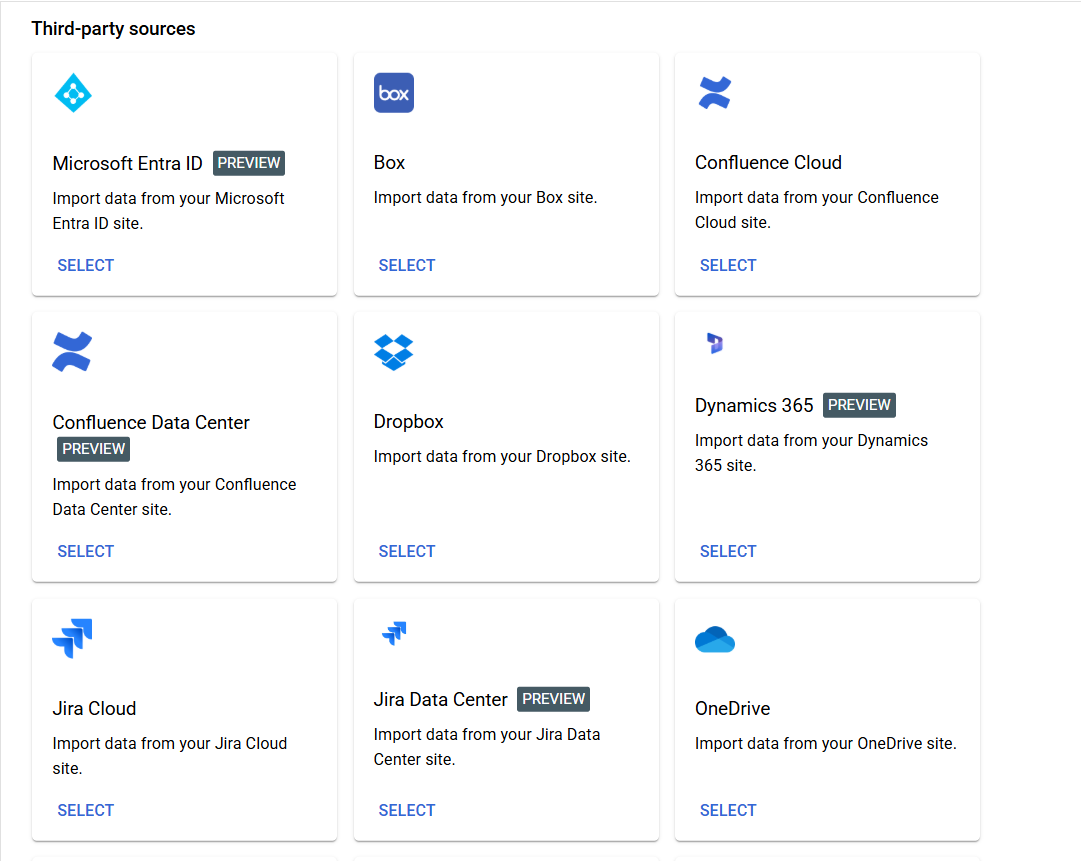
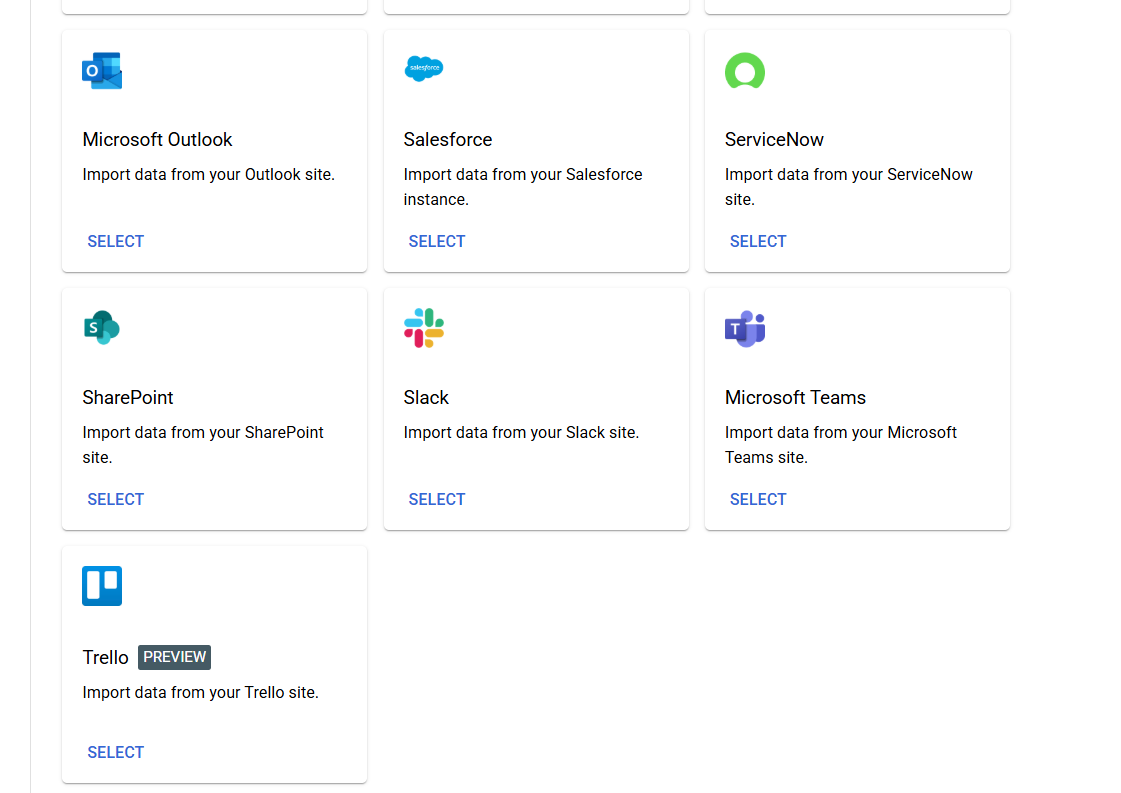
Google AgentSpace connects external data sources to Google Workspace tools. This creates a central data integration platform. AgentSpace third-party connectors are prebuilt, low-code links that bring data from systems such as Jira and SharePoint into AgentSpace. Teams can centralize data from systems like Jira and SharePoint. This enables enterprise data search without data silos.
Supported AgentSpace Third-Party Connectors
AgentSpace supports the following third-party platforms:
- Jira
- SharePoint
- Salesforce
- ServiceNow
- Confluence
- Additional systems in development
Low-code data connectors remove the need for custom code or ETL pipelines. The AgentSpace console provides a standardized interface for integration. Once linked, the system syncs and organizes data automatically.
Streamlined Configuration and Automated Data Synchronization
Google AgentSpace provides a direct method to connect third-party applications. Clear documentation and a guided user interface support onboarding for all user levels. After authentication, AgentSpace syncs enterprise data automatically. It organizes data using Vertex AI embeddings to enable intelligent search.
Key process elements include:
- Regular synchronization maintains current data
- System schema mapping requires minimal manual effort
- Source system access control lists (ACLs) ensure secure data access
AgentSpace manages data lifecycle. It removes stale records and ensures data is clean. This enables accurate AI responses.
AI Data Access Constraints
Access control limits AI performance. Without strict permissions, models lose critical data. Weak controls also breach privacy standards.
Pre-AgentSpace Limitations
- Restricting ingestion to public data reduces insight depth. This limits response accuracy.
- Develop custom data access logic to synchronize permissions from all source systems. This creates a significant technical burden, particularly when integrating systems with distinct access control lists (ACLs).
This is a common challenge when synchronizing permissions in AI applications.
Native ACL Handling in AgentSpace Third-Party Connectors
Google AgentSpace preserves the original ACLs of source systems. This ensures AI-powered data access returns only information that the authenticated user is authorized to view. The indexed Vertex AI embeddings respect these permissions. This enables detailed insights without reducing security.
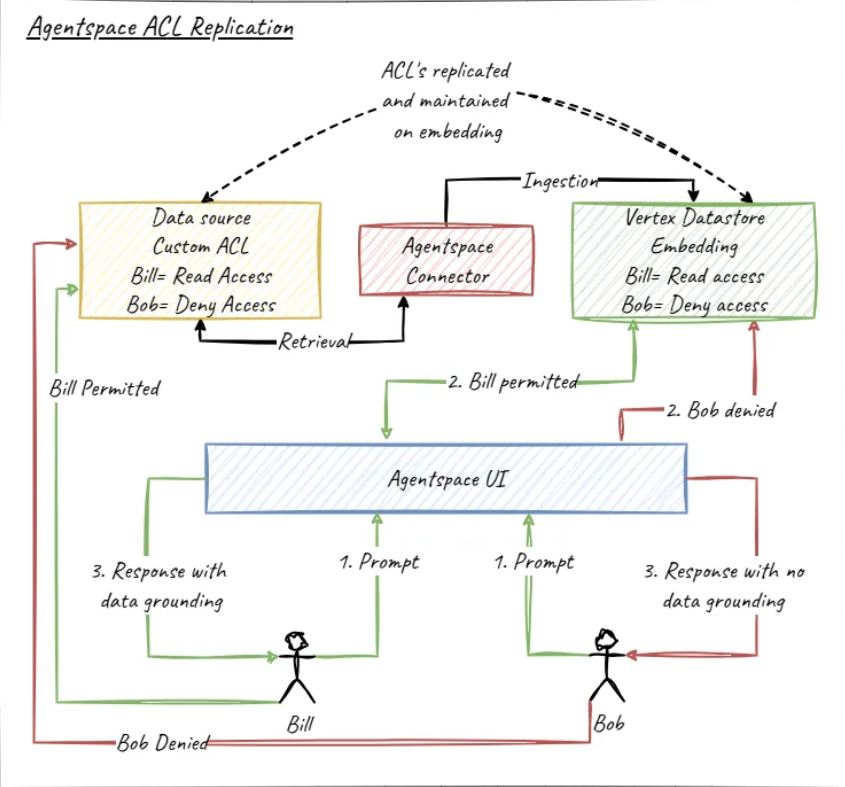
Key benefits of the AgentSpace ACL approach:
- Expand data scope without increased risk
- Access data uniformly across systems
- Reduce security maintenance overhead
- Ensure data search complies with organizational access policies
Example: Connect Jira and SharePoint to AgentSpace. Although these systems use different permission structures, AgentSpace restricts user visibility to data accessible within each native system. This capability supports workflow automation.
Configure Connectors for Precise Data Ingestion
Third-party connectors allow fine-grained control over data ingestion. For example, the Jira integration for AgentSpace limits ingestion to specific projects or entities. You can select issues and comments while excluding attachments or worklogs. This targeted approach: - Reduces storage costs. - Increases indexing speed. - Aligns with data governance policies.
Select Synchronization Options by Use Case
AgentSpace connectors support multiple synchronization modes:
- One-time synchronization for static data
- Run periodic synchronization to update data automatically
- Run manual synchronization to update data on demand
Connectors include health status monitoring in the console. The system alerts administrators to sync cycle errors. This function maintains reliable access to unified data.
Build Custom Connectors to Support Unique System Requirements
Build custom connectors to support unsupported systems. Use the target application API to ingest any data source into the data integration platform.
Check with Google or a partner before starting custom development. Connectors may exist in private preview. Early access reduces effort and shapes platform priorities.
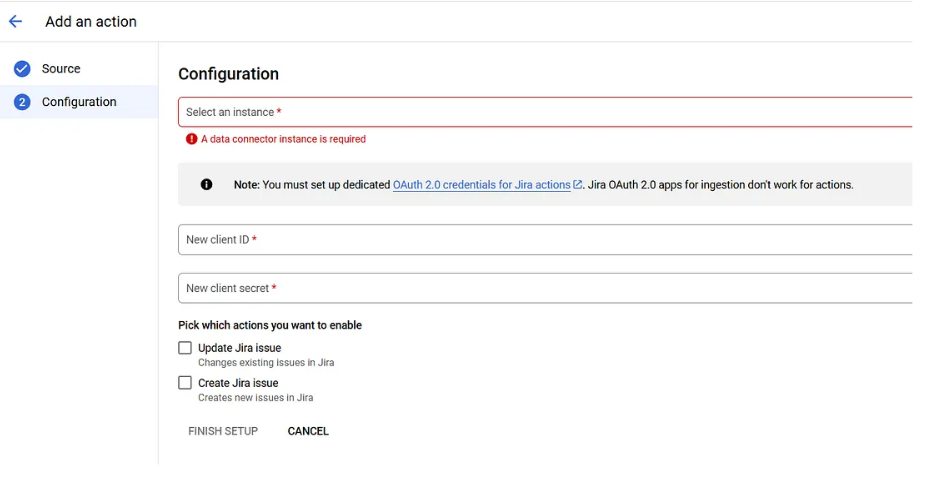
AgentSpace Actions: Interact with Connected Systems
Connectors unify data. AgentSpace Actions enable interaction with connected applications directly in the chat interface.
.
Automate Jira Tasks and Other Processes
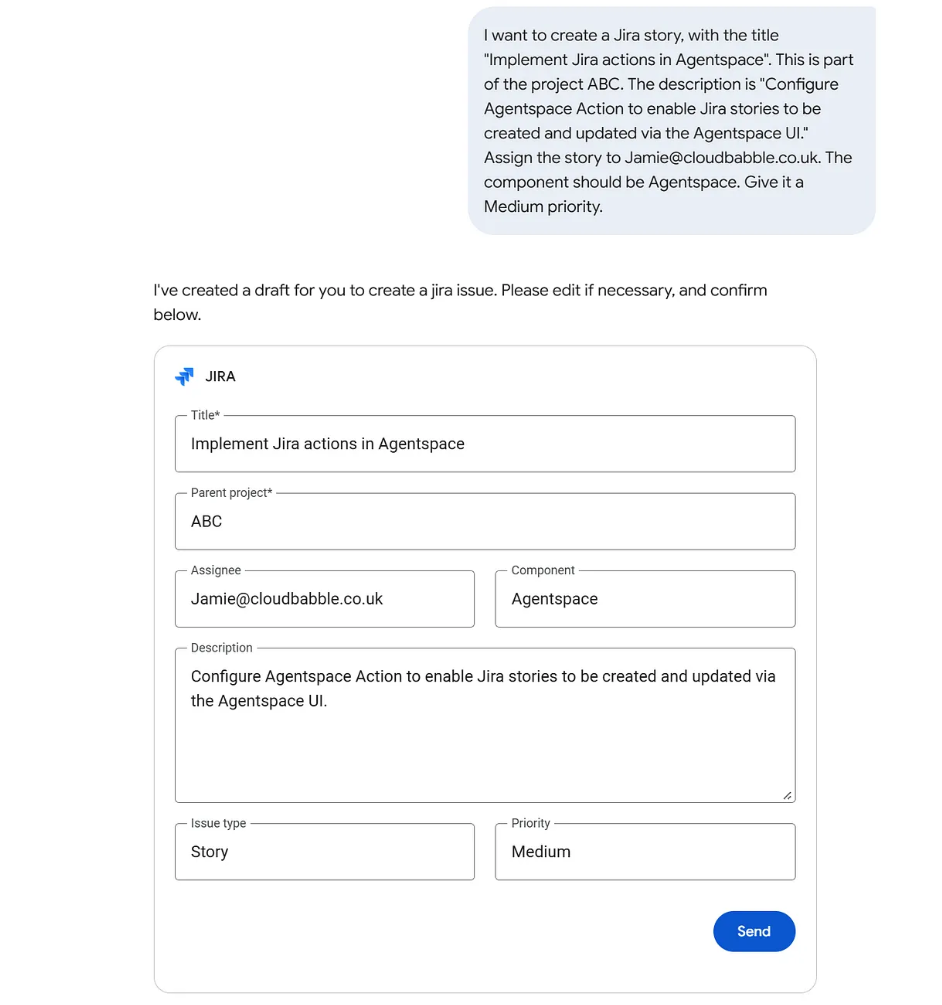
Example: Jira integration enables direct ticket creation, updates, and closures via natural language prompts. The process includes:
- User prompt: “Create a Jira story titled ‘Enable real-time Jira sync in AgentSpace’ with the description ‘Implement periodic synchronization for enhanced data freshness.’”
- AgentSpace extracts details, populates a Jira card, and displays a draft.
- User reviews or amends the draft in chat or via follow-up prompts.
- Upon approval, AgentSpace creates the Jira story and returns a direct link.
AgentSpace extends this mechanism to other applications. It sends curated emails, schedules calendar events, and raises Workday requests. These actions automate workflows.
Real-World Applications: Google AgentSpace Connectors and Actions
The following examples illustrate organizational applications:
- IT Operations: AgentSpace chat escalates ServiceNow incidents. The system creates corresponding Jira stories.
- HR Onboarding: AgentSpace connects Workday and SharePoint data. The system provides rapid, accurate responses to new hire queries.
- Finance: Aggregate Salesforce and internal ERP data for secure, comprehensive financial reporting.
- Marketing: Synchronize SharePoint campaign documents while preserving individual permissions. This provides distributed teams with unified, real-time access to materials.
In each scenario, Google AgentSpace centralizes data and enables user action. This accelerates processes and unlocks enterprise productivity.
Key Takeaways for Optimizing Google AgentSpace
- Connect everything: Integrate Google Workspace with external data sources using prebuilt or custom connectors.
- Maintain Security: Preserve secure, precise access via native Access Control Lists (ACLs).
- Enable Users: Streamline workflows by automating tasks across connected systems using AgentSpace Actions.
- Enhance Insights: Apply AI-driven data access and intelligent search to improve conversation quality.
Conclusion
Google AgentSpace changes how organizations access and use data. It combines intelligent data integration, third-party connectors, and interactive Actions. The platform respects source permissions. It provides a secure, scalable solution for modern enterprises.
AgentSpace unifies your data ecosystem in a single interface. It removes scattered systems and app switching. The platform enables workflow automation.
We will cover AgentSpace Agents in the next post. These agents orchestrate tasks across your business.
Continue reading.
Related resources
Frequently asked questions
Google AgentSpace integrates third-party tools via prebuilt, low-code connectors. These connectors link external systems like Jira, SharePoint, Salesforce, and ServiceNow with Google Workspace. The connectors sync and organize data automatically. They remove the need for complex ETL pipelines. Users access unified enterprise data through search and AI. AgentSpace preserves native access control lists (ACLs) from source systems. It applies these rules during data ingestion and indexing. Users see only data authorized in the original system. AI-powered search respects these permissions. This approach allows broader data ingestion. It maintains enterprise security and governance. AgentSpace solves common data access problems. It addresses fragmented systems, outdated data, and broken permission models. The system syncs third-party data regularly. It applies Vertex AI embeddings. It respects source permissions. This process delivers accurate, real-time, and secure search results. AI assistants generate grounded insights. Data leakage risks decrease. AgentSpace Actions enable direct interaction with connected systems. Users operate systems using natural language. For example, users can create Jira tickets or schedule meetings. They can trigger workflows from a single chat interface. This capability shifts AgentSpace from passive data access to active workflow automation. Enterprise productivity improves. Squareshift helps organizations implement AgentSpace integrations. We design, configure, and optimize integrations based on operational needs. We go beyond enabling connectors. We focus on data access strategy and connector scoping. We validate ACLs and design workflows. We ensure secure and reliable enterprise search. We deliver actionable AI outcomes. Squareshift builds custom connectors and Actions. We serve systems not available as prebuilt integrations. We use secure APIs and governance-first design. We ingest the right data. We preserve source permissions. We automate workflows. We avoid fragile, hard-to-maintain custom AI integrations.
Which third-party tools does Google AgentSpace connect to?
AgentSpace supports Jira, SharePoint, Salesforce, ServiceNow and Confluence, with additional systems in development. Low-code data connectors remove the need for custom code or ETL pipelines. After you link a system, AgentSpace syncs and organizes its data automatically through the console.
How do AgentSpace connectors keep data secure?
AgentSpace preserves the original access control lists (ACLs) of each source system. AI-powered search returns only information the authenticated user may view in the original system. This lets you ingest more data without increased risk, and it reduces security maintenance work.
How often can AgentSpace connectors sync data?
Connectors support three modes: one-time sync for static data, periodic sync that updates data automatically, and manual sync on demand. The console shows connector health status and alerts administrators to sync cycle errors, which keeps access to the unified data reliable.
Can AgentSpace connectors limit which data is ingested?
Yes. The Jira connector, for example, can limit ingestion to specific projects or entities. You can select issues and comments and exclude attachments or worklogs. This targeted approach reduces storage costs, increases indexing speed and aligns ingestion with data governance policies.