
Generative AI extends LLM capabilities beyond text generation. LangChain provides a framework for dynamic, chained workflows. This series covers foundational concepts, advanced methods, and production applications.

LangChain Definition
LangChain is an open-source framework for LLM-powered applications. It standardizes chain creation and integrates external tools. It provides pre-built workflows for common tasks. By connecting models like GPT-4 to external data and computation, LangChain supports the development of adaptable, intelligent systems.
LangChain Core Components
Models
LangChain centers on Large Language Models (LLMs), such as OpenAI’s GPT or Google’s Gemini. The framework provides a unified interface to access these models. Developers can select and switch between LLMs. LangChain supports fine-tuning and customization. This alignment ensures the model fits specific use cases.
Prompts
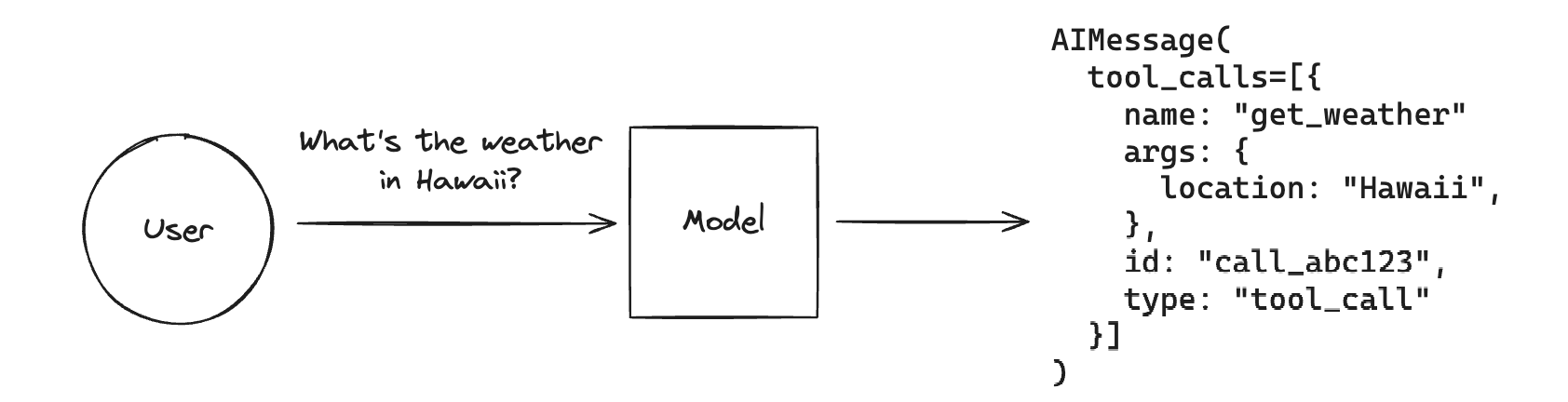
Prompts initiate interaction with LLMs. LangChain uses Prompt Templates to create reusable, parameterized prompts. This structure maintains consistency. It reduces errors in complex workflows with dynamic inputs.
Chains
LangChain Chains build multi-step workflows by linking LLM calls, data transformations, and external API integrations. A chain can summarize a document, extract key points, and save results to a database in a single process. Chains support conditional logic and branching, which adds flexibility to application development.
Agents
Agents make dynamic decisions in LangChain. They use LLMs to select tools and actions in real time. This structure fits applications that need flexible workflows, such as handling user queries, retrieving external data, or adapting to unexpected inputs. Agents allow developers to build agentic workflows that reason and act autonomously.
For multi-agent teams, see CrewAI, a framework that extends LangChain and LangGraph in LangChain.
Tools
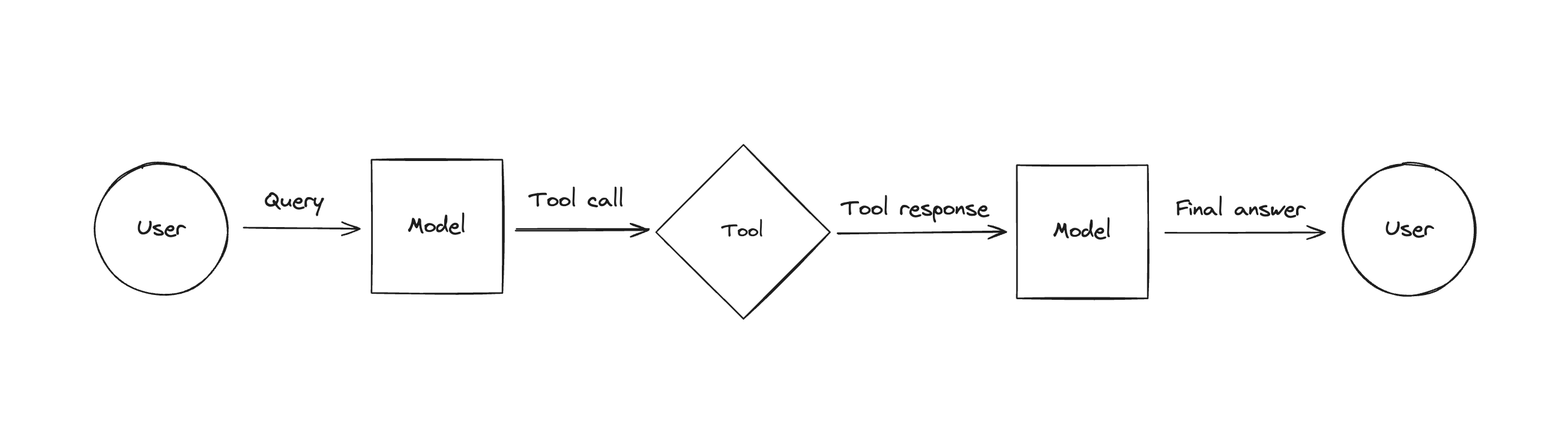
LangChain connects LLMs to external tools. These tools include APIs, search engines, code interpreters, calculators, and databases. Developers create custom tools for specific tasks. Custom tools allow LLMs to fetch real-time data or execute complex computations.
LangChain MCP integration extends this idea to multi-tool AI agents.
Memory
Memory retains context over time. Applications such as chatbots and long-form content generators require this retention. LangChain supports short-term and long-term memory. Short-term memory operates at the session level. Long-term memory uses database backing. The system stores and retrieves relevant information dynamically.
Indexes
Indexes manage large datasets and knowledge bases. They organize and optimize data for rapid retrieval. LLMs access structured and unstructured information more efficiently. Common use cases include document search, Q&A systems, and knowledge-based assistants.
Building a Basic LangChain Workflow
LangChain requires minimal setup. The following steps outline the creation of a basic chain:
Configuring the Development Environment
Install Python 3.7 or later. Create a virtual environment to isolate dependencies.
Installing LangChain
Install LangChain via pip:
pip install langchain
Select an LLM Provider
LangChain supports OpenAI, Anthropic, Cohere, and other providers. Choose a provider. Obtain API keys.
from langchain.llms import OpenAI
model = OpenAI(openai_api_key="...")
Prompt Creation
Import the LangChain prompt template method. The following code demonstrates this process.
from langchain.prompts import PromptTemplate
prompt = PromptTemplate(input_variables=["question"], template="Answer the following question: {question}")
Create a Simple Chain
A chain links the prompt and the model into a single workflow. To create a basic chain:
chain = prompt | model
result = chain.invoke(question="What is LangChain?")
Practical Applications
Online Shopping Assistant
An e-commerce platform uses LangChain to build a virtual assistant. The assistant helps customers find products based on preferences. It answers specification questions. It suggests complementary items. The system analyzes inventory data and customer reviews.
Customer Service Agent
A telecom company uses a LangChain agent to resolve customer issues. The agent troubleshoots internet problems. It updates account details. It schedules technician visits. The agent retrieves data from APIs and databases.
Document Analysis
A law firm uses LangChain to analyze long contracts. The system identifies key clauses and generates summaries. This process speeds up reviews and improves decision-making. It maintains legal compliance.
Next Steps
The first LangChain workflow is complete. Expand the workflow’s complexity.
- Add multiple stages to the chain.
- Introduce conditional logic.
- Integrate external tools.
LangChain supports seamless workflow expansion. This approach creates intelligent applications.
Review future updates to learn how LangChain adds intelligence and adaptability to AI projects.