

Introduction: What Is LangChain MCP Integration?
AI technology evolves rapidly. New frameworks and tools emerge frequently. This creates integration complexity. Developers require systems that select the correct tool for specific tasks. Connecting disparate systems requires a standardized approach.
Developers building with LangChain or LangGraph often face integration barriers when using Anthropic Model Context Protocol (MCP). LangChain handles conversational AI and complex workflows. MCP exposes specialized tools, data, and prompts. LangChain MCP integration connects LangChain agents to MCP tools, data, and prompts through the langchain-mcp-adapters library. This guide demonstrates the connection.
The langchain-mcp-adapters library acts as a protocol bridge. It enables LangChain to communicate with Model Context Protocol (MCP) tools. This design allows developers to focus on core agent logic. It reduces the complexity of integration tasks.
The Value of LangChain and MCP Integration
Access to Expanded Toolsets
LangChain and MCP integration adds specialized capabilities to multi-tool AI agents. The system connects to external tools directly:
- Connect mathematical solvers, weather services, or custom database interfaces to the agent environment.
- Consolidate tools from multiple servers into one AI agent.
- Simplify tool orchestration to enable context-aware interactions.
Eliminate manual workarounds. The LangChain MCP adapter library manages tool orchestration. Focus on innovation.
Implementing a Multi-Tool AI Agent: A Practical Guide
Build a React agent that integrates tools from an MCP server hosting MySQL utilities. Use Google’s Gemini model for reasoning. Use LangGraph’s ReAct agent for planning and execution. The agent will:
- Connect to a MySQL database
- Query databases, list tables, and retrieve server statuses
- Run custom SQL commands with immediate feedback
This method uses LangChain MySQL integration with MultiServerMCPClient to manage connections across multiple MCP servers
Example: LangChain MCP Integration
01pythonimport asyncio
from langchain_mcp_adapters.client import MultiServerMCPClient
from langgraph.prebuilt import create_react_agent
async def main():
client = MultiServerMCPClient({
"mysql": {
"command": "python",
"args": ["mysql_mcp_server.py"],
"transport": "stdio",
}
}
tools = await client.get_tools()
agent = create_react_agent("gemini:gemini-2.0-flash", tools)
print("Test: MySQL MCP Server with Gemini 2.0 Flash")
response1 = await agent.ainvoke({"messages": "List all databases"})
print("Response 1:", response1)
response2 = await agent.ainvoke({"messages": "Show me all tables in the mysql database"})
print("Response 2:", response2)
response3 = await agent.ainvoke({"messages": "Execute SELECT VERSION() to get MySQL version"})
print("Response 3:", response3)
response4 = await agent.ainvoke({"messages": "Show me the MySQL server status"})
print("Response 4:", response4)
if __name__ == "__main__":
asyncio.run(main())
How the LangChain MCP Integration Works
1. Initialization:
- Configure `MultiServerMCPClient` to connect to one or more MCP servers. This example connects to a MySQL server.
2. Tool Discovery:
- Execute `await client.get_tools()` to retrieve tools exposed by the MCP server. These tools become available to the agent, enabling dynamic tool discovery.
3. Agent Creation:
- create_react_agent() links the Gemini LLM to discovered tools. The agent performs dynamic reasoning and actions as a single unit.
4. Run Query:
- Use ainvoke() to send natural language instructions. The agent interprets these instructions using tools from the LangChain adapter library.
Orchestrate Multiple MCP Servers with MultiServerMCPClient
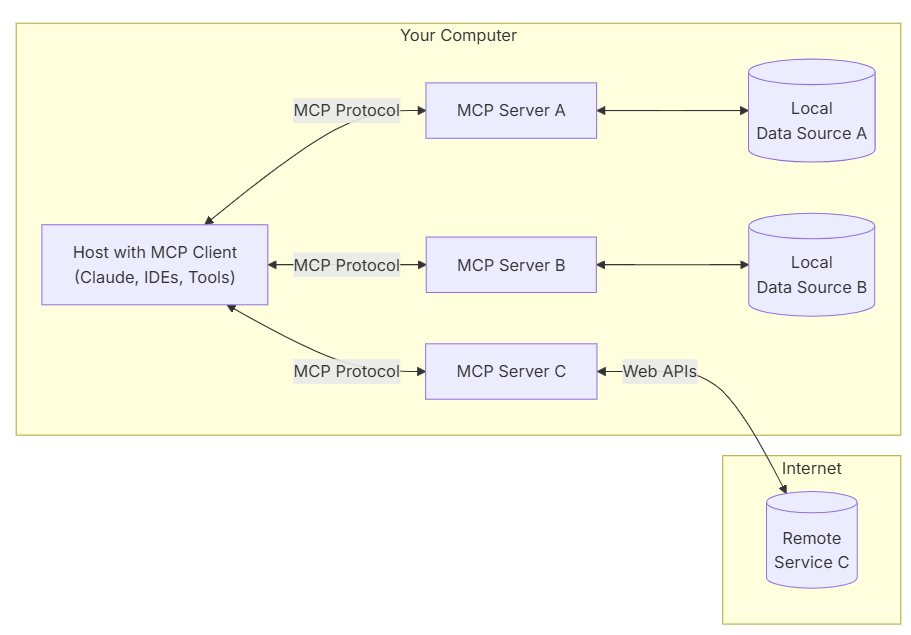
LangChain MCP Integration gains power from connecting multiple specialized MCP servers. Unify these systems:
- Math Server: Performs algebraic calculations.
- Weather Server: Provides real-time forecasts.
- Database Server: Manages structured data in MySQL, PostgreSQL, or MongoDB.
- Custom API Server: Exposes proprietary services.
MultiServerMCPClient aggregates tools from these servers. This enables agents to perform context-aware reasoning and diverse task execution.
How Multi-Server MCP Architectures Extend Agent Capability
- Modularity: Update individual servers independently.
- Security: Isolate sensitive tools.
- Scalability: Scale specific servers as needed.
- Specialization: Optimize servers for distinct workloads.
- Vendor Diversity: Integrate tools from multiple providers.
MCP Components: Prompts, Resources, and Tools
Prompts: Define LLM Behavior
Prompts provide instructions to guide agent interactions. Example:
01python@mcp.prompt(
name="connect_to_database",
description="Connect to a MySQL database. Configure host, port, user, password, and database name."
)
def connect_to_database():
return "You are an expert in MySQL database connections. Establish a connection before performing any database operations."
You are an expert in MySQL database connections. Establish a connection before performing database operations.
Resources – Contextual Intelligence
Resources provide agents with contextual data, such as database connection guides or schema references.
Tools – Executing Actions
Registered tools allow agents to perform actions, such as connecting to a database or running SQL queries:
01python@mcp.tool(
name="connect_database",
description="Connect to a MySQL database. Use this tool first to establish a connection before performing database operations.",
)
def connect_database(...):
...
Combining Prompts, Resources, and Tools enables agents to understand, plan, and execute complex tasks.
Resolve LangChain MCP Integration Errors
Common issues in a LangChain MCP setup include:
- Connection errors. Verify server configuration and network access.
- Tool Discovery Failure: Verify that the MCP server exposes tools correctly.
- LLM Misinterpretation: Refine prompt phrasing or tool descriptions.
- Authentication Error: Provide correct credentials and confirm server support.
Conclusion: Full Implementation of LangChain MCP Integration
LangChain MCP Integration enables developers to build advanced, multi-tool AI agents. Merging LangChain orchestration with Anthropic MCP tools creates adaptable, context-aware AI solutions.
Start using the langchain-mcp-adapters library now. Test and validate its capabilities. Share results with the community. Build the next generation of intelligent agents.
Mechanics
Related reading: building a smart Elasticsearch agent with LangGraph and Gemini and LangGraph for multi-agent systems in LangChain.
Frequently Asked Questions
What problem does LangChain MCP integration solve? LangChain MCP integration simplifies tool connection for AI agents. Agents discover and use MCP tools without hard-coded integrations. This supports scalable, context-aware agents that adapt to new tools and servers.
How does MCP differ from traditional API integration? MCP standardizes the exposure of tools, prompts, and resources to agents. Agents discover and reason over MCP tools automatically. This creates modular, secure architectures with lower maintenance costs.
When should you use multiple MCP servers? Use multiple servers for specialized tools such as databases, analytics, or external APIs. Separation improves security, scalability, and fault isolation. Each server optimizes specific capabilities while the agent orchestrates them.
How does Squareshift implement LangChain MCP integration? Squareshift designs, builds, and scales MCP integrations aligned with business workflows. Services include MCP server design, tool orchestration, and secure multi-server deployment. Squareshift ensures agents are production-ready, governed, and performant in enterprise environments.
Why partner with Squareshift for multi-tool AI agents? Squareshift helps move from prototype to enterprise-grade agents. The team provides expertise in agentic AI design, MCP orchestration, and scalable LangChain architectures. This reduces integration complexity and accelerates time-to-value.
What does the langchain-mcp-adapters library do? The langchain-mcp-adapters library acts as a protocol bridge. It lets LangChain communicate with Model Context Protocol (MCP) tools, so developers can focus on core agent logic instead of integration work. It manages tool orchestration and reduces the complexity of connecting the two systems.
What is MultiServerMCPClient used for? MultiServerMCPClient connects an agent to one or more MCP servers. The call await client.get_tools() retrieves the tools each server exposes, so one agent can use math, weather, database or custom API servers together. The guide's example connects it to a MySQL MCP server.
How do you fix common LangChain MCP integration errors? The guide lists four common problems. For connection errors, verify server configuration and network access. For tool discovery failure, check that the MCP server exposes its tools correctly. For LLM misinterpretation, refine prompt phrasing or tool descriptions. For authentication errors, provide correct credentials and confirm server support.
Which agent type and model does the LangChain MCP example use? The example builds a ReAct agent with LangGraph's create_react_agent and uses Google's Gemini model for reasoning. It connects to an MCP server that hosts MySQL utilities, so the agent can list databases, show tables, run SQL such as SELECT VERSION() and report server status.