
Introduction: Multimodal AI Development
Enter text, upload images, or combine both inputs. Gemini 2.0 Flash responds immediately. This model processes text, code, and images. It is designed for seamless multimodal interaction.
Developers and business teams can use Google AI Studio to build faster solutions. The platform supports the following capabilities:
- Create prompts for AI systems.
- Integrate AI models into applications using APIs.
Explore the capabilities of Gemini 2.0 Flash.
Gemini 2.0 Flash: Function and Value
Gemini 2.0 Flash is a high-speed multimodal AI model. It processes multiple input types.
- Text: Generate or process written content.
- Images: Analyze photos, diagrams, or screenshots.
- Code: Write, debug, and explain programming logic.
Application Example
Scenario 1: Build an AI chatbot for customer support
Upload a screenshot of a broken webpage or faulty code. Gemini 2.0 identifies issues and suggests fixes. This streamlines troubleshooting and reduces resolution time.
Scenario 2: Create educational content
Provide an image of geographical maps, medical diagrams, or mathematical equations. Gemini 2.0 generates explanations, interactive lessons, or quizzes. This automates content preparation and saves time.
Scenario 3: Enhance fintech solutions
Analyze a financial dashboard or bank statement. Upload the image. Gemini 2.0 interprets data, identifies discrepancies, and provides insights. This supports quick audits and reporting.
Scenario 4: Accelerate medical diagnostics
Medical professionals can upload X-rays, MRI scans, or symptom diagrams. Gemini 2.0 assists by identifying anomalies, summarizing findings, and suggesting potential actions. This streamlines preliminary diagnostics.
Explore Google AI Studio: A Developer Environment
1. Two methods to build with Gemini 2.0
Google AI Studio provides two build pathways:
- Google AI Studio: A browser-based platform for prompt creation and model testing.
- API Access: Integrate Gemini 2.0 Flash via REST APIs in Python, Node.js, or Flutter.
Utility: Supports novice users exploring generative AI and developers automating workflows.
2. User Interface Overview
The interface streamlines model configuration and evaluation.
- New Prompt: Interact with the model.
- Run Settings: Adjust temperature to control response variability. Monitor token usage to optimize API calls.
- Tools:
- Structured Output: Return responses in JSON format for application or database integration.
- Function Calling: Link AI responses to external workflows or tools.
Tip: Increase temperature for creative tasks such as poetry or brainstorming. Decrease temperature for precise, factual responses.
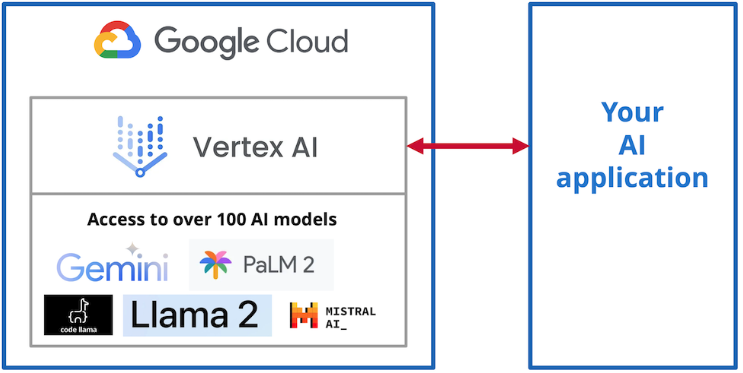
VertaxAI model: Gemini 2.0 Flash
Gemini 2 integrates multimodal processing and advanced reasoning. It supports intelligent automation across multiple industries.
Build Your First Gemini 2.0 Flash Project in Google AI Studio
Register for Google AI Studio
Write Your First Prompt
Example: Upload a photo of a cat and ask: "What breed is this cat, and can you write a short story about it?" Gemini identifies the breed and generates a narrative.
Obtain the API Key
Select the 'Get API Key' button. Use the key to enable Gemini 2.0 Flash in applications, mobile tools, or dashboards.
- Access Google AI Studio and sign in with your Google account.
Real-World Applications of Gemini 2.0 Flash
Gemini 2.0 Flash supports multimodal input, including text, code, and images. This capability extends its use beyond chatbots to diverse industry applications.
1. E-commerce
- Create an AI assistant. Upload product images. Generate SEO-optimized titles, descriptions, and tags immediately.
Example
Input: Upload a photo of a red sneaker.
Output: "Stylish Red Running Shoes, Lightweight Comfort, Ideal for Jogging and Sports."
2. Healthcare and Medical Applications
Gemini 2.0 Flash optimizes clinical workflows by processing medical images and text data.
- Assistive Diagnosis: Upload an X-ray image alongside clinical text, such as “Patient reports chronic chest pain.” The model generates preliminary observations for physician review.
- Report Summarization: Convert detailed medical records into concise summaries for rapid analysis.
Use Case:
Input: Upload a chest X-ray image. Ask, “What irregularities are visible?”
Output: “The X-ray shows signs of left-sided pleural effusion. Schedule a follow-up examination.”
3. Fintech and Financial Services
Gemini 2.0 Flash optimizes financial workflows. It supports decision-making and improves customer engagement in the fintech sector.
- Fraud detection: Upload transaction logs or suspicious patterns. The model flags anomalies and suggests corrective actions.
- Parse financial documents and assess risk. Extract key data from loan applications or insurance claims.
Example:
Upload a scanned financial statement. Ask: "Does this statement meet regulatory compliance requirements?"
The report complies with Section 12 of the Financial Act. Clarify the listed liabilities.
4. Education
Educators and students can automate content generation, explanations, and evaluations.
- Upload diagrams, maps, or charts. Gemini generates quizzes, study material, or explanations.
Example
Input: Upload a diagram of the human heart. Prompt: “Explain this to a 7th-grade student.”
Output: “This is a human heart. It pumps blood through the body. The left and right sides work together to ensure oxygen flows to all organs.”
5. Code Debugging and Development
Developers use Gemini 2.0 to optimize coding workflows.
- Bug Fixing: Upload code snippets with errors to receive debugging suggestions.
- Code Explanation: Use Gemini to analyze complex or legacy code.
6. Customer Engagement Chatbots
- Gemini 2.0 Flash processes text and image inputs to support advanced chatbots.
Example:
A travel chatbot analyzes destination images and suggests itineraries:
Upload a photo of the Eiffel Tower. The chatbot responds: "Paris, France! Would you like a 3-day itinerary for Paris attractions?"
Gemini 2.0 Flash Developer Benefits
1. Shorter Development Cycles
- Gemini processes requests rapidly. This feature suits real-time apps, including chatbots, content tools, and dynamic dashboards.
2. Unified Multimodal Input
- You do not need separate tools. Send text, code, and images in one query.
3. Direct Integration
- The Get API Key option enables developers to connect Gemini to existing technology stacks in three steps.
The Gemini 2.0 model processes more than 1 million tokens. This capacity supports the analysis of long documents, videos, and large datasets.
Next Steps for Gemini 2.0 Implementation
Gemini 2.0 Flash and Google AI Studio support the development of AI applications, workflow automation, and technical exploration.
Begin with the following actions:
- Open Google AI Studio and create a prompt.
- Copy the API key and integrate Gemini 2.0 Flash into your environment.
- Test the model, refine your approach, and share the results.
Begin building with Gemini 2.0 Flash today. Access the full capabilities of this model.
SquareShift offers AI implementation services for teams that want to build multimodal applications like these.
For more on building with LLMs, read our practical guide to LLM-powered applications and our best practices for agent apps on Vertex AI.