
Data integrity is critical during the migration from Tableau to Looker. Discrepancies between historical and new reports erode user trust in the analytics infrastructure.
This guide details a systematic approach to migration. It defines discovery, replication, and validation methods to ensure data accuracy and consistent insights in Looker.
Short answer: define the source of truth, preserve the Tableau business logic, define metrics once in LookML, then test at the View and Explore level and compare each Looker dashboard side by side with the Tableau original.
Begin the Tableau to Looker Migration
Foundation: Ensuring Data Integrity in Tableau-to-Looker Migration
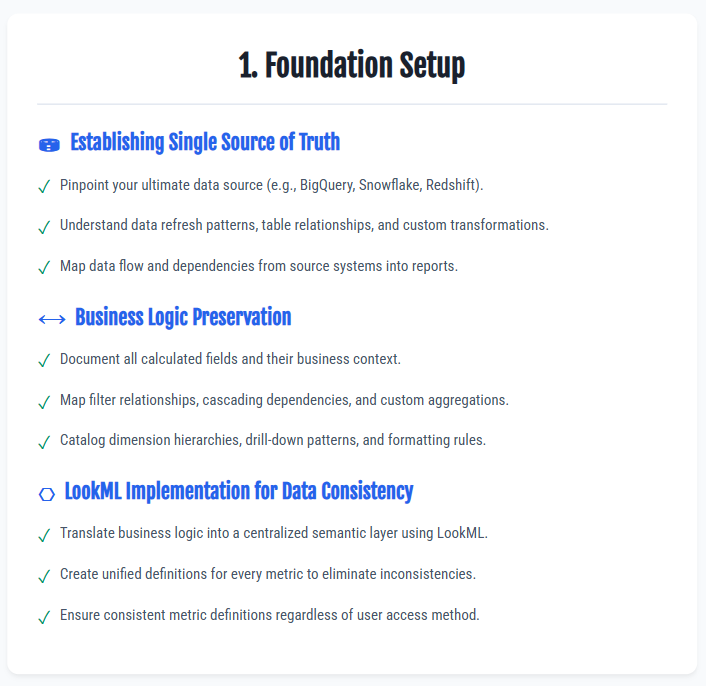
Define the Single Source of Truth for Migration Success
Identify the authoritative data source. Most modern architectures use cloud warehouses such as BigQuery, Snowflake, or Redshift. Use this database as the reference point for all migration validation to ensure consistency.
Verify more than connectivity. Document data refresh patterns, table relationships, and custom transformations that drive report logic. Map update schedules and dependencies between datasets.
Preserve Business Logic During Migration
Existing Tableau dashboards contain established business logic. Each calculated field, filter, and metric reflects specific performance measurement standards. Deconstructing this logic maintains data integrity during the migration to Looker.
Key reverse engineering activities for migration accuracy:
- Document all calculated fields and their business context.
- Map filter relationships and cascading dependencies.
- Identify custom aggregations and Level of Detail expressions.
- Document dimension hierarchies and drill-down patterns.
- Record formatting rules and conditional logic.
This mapping serves as the blueprint for building Looker. It preserves knowledge of expected metric behavior.
Implement LookML for Data Consistency
Looker Modeling Language (LookML) centralizes business logic in a semantic layer. This approach creates unified definitions for metrics. It eliminates inconsistencies caused by conflicting definitions across tools.
A semantic layer standardizes metric definitions across all data access points. This centralization eliminates discrepancies common in multi-tool environments, where different dashboards often provide conflicting answers to the same business question.
Plan Your Migration: Contact Our Specialists
View and Explore Level Testing in Looker
The initial checkpoint requires detailed review at the View and Explore level. This approach validates data integrity during migration through precise technical checks.
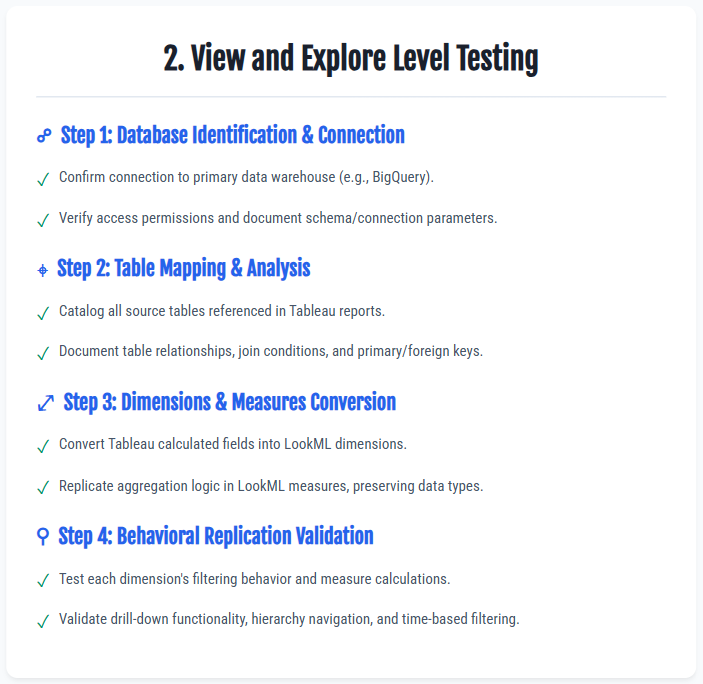
- Identify the database source, typically BigQuery. Verify the connection and access permissions. List all tables used in the original Tableau reports. Document table relationships and any custom SQL or complex joins.
- Convert table fields into LookML dimensions and measures. Map each source field to a specific role. Use dimensions for filtering and grouping. Use measures for aggregation and calculation. Replicate Tableau behavior exactly.
- Test each element individually to prevent downstream errors. Run queries in the Looker Explore interface. Verify that dimensions filter data identically to Tableau. Confirm that measures return identical results. Inspect date dimensions and time-based filtering. These elements often differ between platforms.
This approach at the Explore level detects data inconsistencies. It prevents errors from reaching dashboards. This reduces troubleshooting time during migration.
Dashboard-Level Migration: How to Validate Data Integrity
This systematic approach ensures data integrity. It covers the visualization layer of the Tableau to Looker migration.
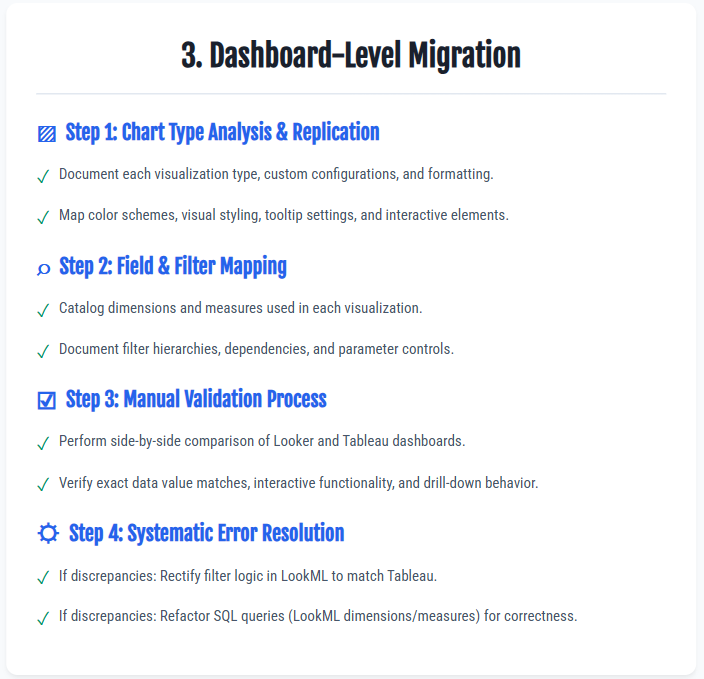
- Inventory dashboard visualizations. Classify each chart by complexity, format, and interactivity. Record:
- Chart type (simple or dual-axis)
- Color schemes
- Tooltip configurations
- User-dependent interactive elements
This inventory serves as the recreation blueprint for Looker. - Map data inputs for each visualization. Identify the dimensions and measures that feed each chart. Analyze filter interactions:
- Cascading filters
- Independent filters
- Relative date logic
Precise replication of filter behavior is required for data integrity. - Perform a manual side-by-side comparison. Validate the new Looker dashboard against the original Tableau version. Assess:
- Numerical accuracy
- Drill-down functionality
- Tooltip content
- User experience consistency
Confirm that interactivity matches user expectations. - Resolve discrepancies using a systematic approach. Apply targeted fixes:
- Filter issues: Adjust LookML definitions to match Tableau behavior.
- Query issues: Refactor underlying SQL logic to generate expected results.
This method prevents recurring errors across dashboards.
Audit testing is the final validation layer.
Request a Migration Consultation
Mitigate Data Integrity Risks in Migration
Specialized expertise accelerates enterprise migrations while maintaining data accuracy. SquareShift's Assessment Accelerator provides migration intelligence that supports data integrity in Tableau to Looker transitions.
The Assessment Accelerator catalogs existing Tableau environments. It analyzes complexity patterns that affect data integrity. Identifying accuracy risks before migration starts prevents discrepancies. This approach ensures reliable validation throughout the process.
View Looker Solutions and Services
Request an expert consultation.
LookML ensures data consistency. Looker Modeling Language (LookML) creates a centralized semantic layer. This layer defines all business metrics in a single location. This structure removes calculation conflicts between tools. It ensures a single source of truth.
SquareShift validates dashboard accuracy. Our Assessment and Migration accelerator automates the validation process. We compare the new Looker dashboard with the original Tableau version. This check verifies that numbers match. It also confirms that the user experience remains consistent. This includes drill-downs, tooltips, and interactive filters.
The Assessment Accelerator prevents accuracy risks. It scans the Tableau environment. It identifies and catalogs existing complexities. It finds undocumented logic before migration. This process builds a reliable validation framework. It reduces the risk of errors during migration.
SquareShift delivers end-to-end migration. We use a proven methodology and proprietary tools. The Assessment Accelerator provides full visibility. The Migration Accelerator automates up to 80% of manual work. This approach reduces errors and delays. It ensures a faster and more accurate migration.
SquareShift applies these checks in its Tableau to Looker migration service.
Related guides: the Tableau to Looker migration roadmap and common challenges in Tableau to Looker migration.