
Marketing analytics measures customer behavior, optimizes campaigns, and increases return on investment (ROI). Google BigQuery (BQ) and Looker store, analyze, and visualize large marketing datasets. A previous article described how CMOs use analytics. This article explains the use of Looker and BigQuery for marketing analytics.
Reasons to Use BQ
Google BigQuery is a serverless data warehouse. It runs SQL queries on large datasets. The system scales to process customer interactions, ad performance, and website traffic. BigQuery connects to sources such as Google Analytics 4 (GA4). It stores and processes raw, unsampled data from multiple marketing platforms.
Why Looker
Looker is a business intelligence and data visualization tool. It builds clear dashboards and reports. Marketing teams use it to explore data. They derive insights using LookML. LookML is a modeling language. It simplifies SQL queries. Analysts use Looker to visualize BigQuery data. They customize metrics. They create real-time dashboards. These dashboards track campaign performance.
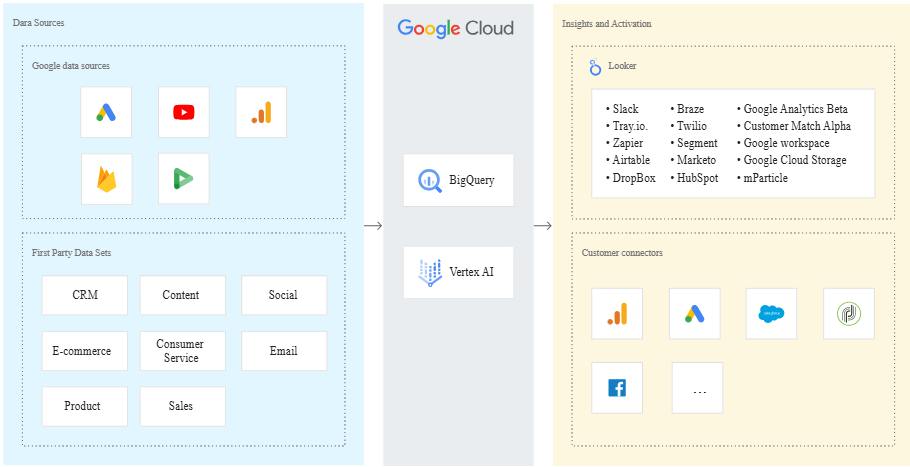
How Looker and BigQuery Interact
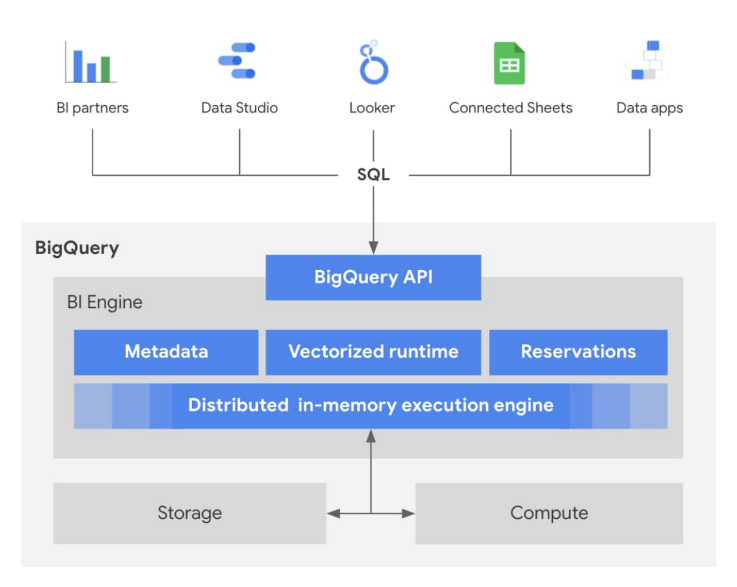
Looker and BigQuery work together to improve marketing analytics. This combination enables efficient processing of large datasets. It supports analysis at scale. It visualizes results without complex technical setup.
- BigQuery stores raw marketing data from multiple sources. These sources include GA4, CRM systems, email platforms, and ad networks like Google Ads. Analysts query this data directly in BigQuery. They extract specific information for analysis.
- Looker uses LookML to simplify data modeling and querying. * Define relationships and metrics once * Reuse definitions across reports and dashboards * Reduce repetitive SQL * Ensure organizational data consistency
- Looker provides visualization and reporting tools. * Build interactive, real-time dashboards * Track campaign effectiveness, CAC, and ROAS * Update automatically as data enters BigQuery * Provide immediate performance insights
Marketing Analytics Use Cases
Looker and BigQuery support customer segmentation.
- Use behavioral and transactional data
- Segment by actions, purchase patterns, demographics, and engagement channels
- Enable targeted and personalized marketing efforts
- Looker visualizes BigQuery data for attribution modeling. * Build models to track user journeys across touchpoints * Identify campaigns that drive conversions and revenue * Optimize budget allocation based on performance
- Real-time Campaign Monitoring - Looker visualizes live data. - Marketers track active campaigns. - Dashboards display: - Click-through rates - Conversions - Cost per acquisition - Teams adjust strategies to maximize ROI. - Ken Williams. - Reference: Digital learning ecosystem enterprise transformed through Looker migration.
- Predictive Analytics - BigQuery processes advanced analytics. - BigQuery runs machine learning models. - Marketing teams use predictive insights to forecast: - Trends - Customer lifetime value (CLTV) - Churn rates - Looker visualizes these predictions. - Teams take proactive actions to: - Retain customers - Boost revenue
Benefits of Using Looker and BigQuery for Marketing Analytics
- Scalability - BigQuery scales with data volume. - BigQuery handles millions of website visitors. - BigQuery handles thousands of ad impressions. - Queries remain fast. - Looker queries and visualizes this data efficiently. - Looker supports complex reports.
- Unified Data View - Looker and BigQuery provide a single view of data. - Data integrates across all marketing channels. - Sources include: - Website analytics - CRM systems - Email platforms - Data visualizes in one dashboard. - This eliminates data silos. - This enables cross-channel analysis.
- Cost Efficiency. BigQuery uses a serverless model. You pay only for the queries you run. This keeps costs low for large datasets. Looker optimizes data models. This reduces unnecessary queries. Lower query volume lowers total cost.
- Real-Time Insights. Marketing moves quickly. Teams need current data. Looker provides real-time dashboards. These show trends, campaign performance, and customer behavior. Teams make decisions faster with fresh data.
Summary
Looker and BigQuery form a strong toolkit for marketing. They handle complex data and support deep analysis. Teams make better decisions with this setup. Use this combination to segment customers or optimize spend. It helps predict future trends. Looker visualizes data stored in BigQuery. This creates clear, actionable reports. These reports improve campaign outcomes. They increase return on marketing investment.
To learn about the migration process, contact us.
Related reading: customer segmentation with Looker and BigQuery, and real-time campaign optimization with BigQuery and Looker.
Contact Us