
Real-time insights drive campaign performance. Marketers need data to adjust strategies during execution. This article explains how BigQuery and Looker convert raw data into actionable insights.
Why Real-Time Optimization Is Essential
Campaigns span social media, email, search, and display. Marketers process large data streams to:
- Detect trends and patterns in real time.
- Adjust strategies to raise click-through rates (CTR) and conversions.
- Reduce waste by reallocating budgets based on performance.
Lack of real-time insights causes missed opportunities and overspending.
Rationale for BigQuery and Looker
BigQuery and Looker enable real-time campaign optimization.
- BigQuery is a serverless, scalable data warehouse. It processes large data volumes in real time. Integration with live data sources supports immediate querying and analysis.
- Looker is a modern business intelligence (BI) tool. It connects to BigQuery. Intuitive dashboards and the LookML modeling layer support data visualization and actionable insights.
These tools help marketing teams make fast, accurate, data-driven decisions.
Real-Time Campaign Optimization Workflow
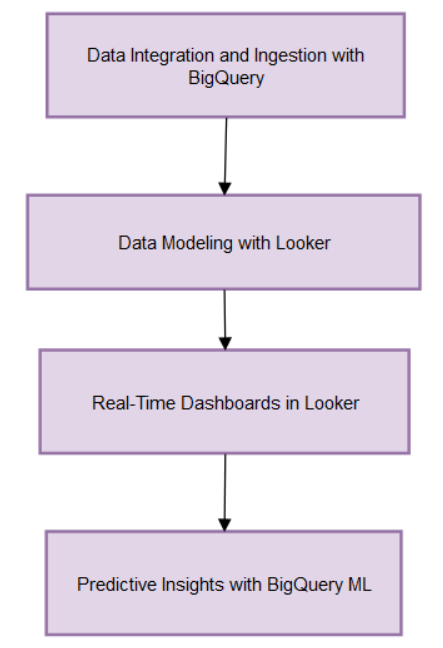
BigQuery and Looker streamline real-time campaign optimization.
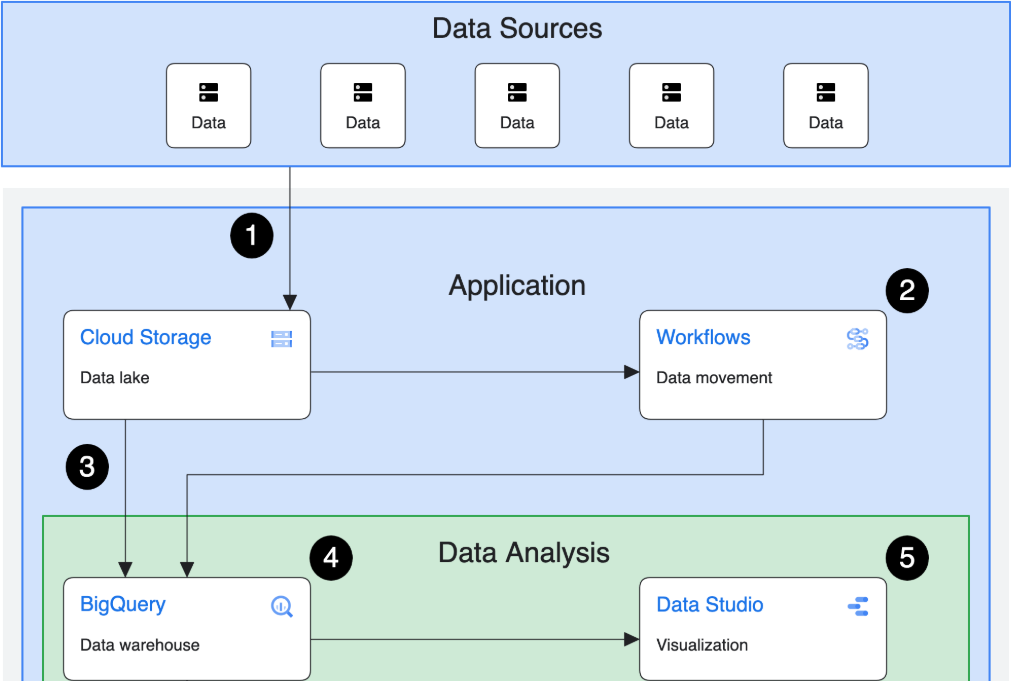
1. Data Integration and Ingestion with BigQuery
BigQuery ingests data from Google Ads, Facebook Ads, CRM systems, and website analytics platforms using these connectors:
- Google Cloud Dataflow: Streams real-time data.
- BigQuery Data Transfer Service: Performs scheduled batch data transfers.
BigQuery aggregates data from these sources into a centralized dataset. This dataset provides a unified view of campaign metrics, including impressions, clicks, CTR, conversions, and spend.
2. Build Data Models in Looker
Looker uses LookML to define models for data in BigQuery. These models specify relationships and calculations. Examples include:
- CTR = (Clicks / Impressions) * 100
- Cost per Conversion = Spend / Conversions
- ROI = (Revenue - Spend) / Spend
Standardized models ensure metric consistency across dashboards. They provide reliable data for analysis.
3. Monitor Campaign Performance with Real-Time Looker Dashboards
Looker dashboards enable real-time monitoring of campaign performance. Key capabilities include:
- Filters: Analyze data by geography, audience segment, or campaign type.
- Alerts. Set thresholds for metrics such as CTR or spend. The system sends notifications when values exceed limits.
- Custom Visualizations. Use trendlines, heatmaps, and funnel charts for detailed analysis.
A dashboard displays a spike in CTR for an ad group. This data supports immediate budget reallocation to capture the trend.
4. Predictive Insights with BigQuery ML
BigQuery ML predicts campaign outcomes. For example:
- Churn prediction: Identify audiences at risk of disengagement and apply retention campaigns.
- Optimal bid strategies: Predict bid amounts that maximize return on investment.
Looker dashboards integrate predictive insights. Teams use these insights to adjust strategies proactively.
Case Study: Optimize Campaign Outcomes with BigQuery and Looker
Consider ShopEase, an e-commerce company. ShopEase prepares for a holiday sale. The company runs campaigns across Google Ads, Facebook Ads, email marketing, and website promotions. The following steps outline this process.
- Unified Data Platform: Integrate Google Ads, Facebook Ads, and Shopify data into BigQuery.
- Real-Time Monitoring: Configure Looker dashboards to track key metrics such as ROI and CTR.
- Predictive Modeling: Use BigQuery ML to identify high-value customer segments.
- Automated Adjustments: Use APIs to dynamically adjust bids and reallocate budgets.
Results:
During the first week of the holiday sale, ShopEase achieved the following:
- 40% reduction in wasted ad spend, reallocating $10,000 to top-performing campaigns.
- 20% increase in CTR from optimized audience targeting.
- 25% higher ROI via predictive insights and automated adjustments.
The real-time feedback loop provided by BigQuery and Looker drove these results.
Conclusion
Real-time campaign optimization is a requirement. The BigQuery and Looker combination provides a scalable solution. This architecture supports competitive positioning in digital markets. The system integrates data, derives insights, and automates actions. These processes increase marketing impact and reduce waste.
Marketing practices will change. Organizations that invest in real-time optimization today secure a strong position in the future data-driven environment.
Related reading: Looker and BigQuery for marketing analytics, and integrating Looker with BigQuery.