
Elasticsearch is a distributed system used for search, logs, and metrics. Production deployments, self-hosted or cloud-based, require infrastructure and cluster configuration planning. This process ensures reliable performance. This article defines methods to estimate capacity and create deployment plans using usage metrics.
In short: keep each shard between 10 and 50 GiB, run at least three master nodes, and limit shards per node to 20 per GiB of Java heap.
Capacity Planning
- Determine the Minimum Number of Master Nodes
- Elasticsearch Service Sizing
Determine Minimum Master Node Count
Master nodes control cluster-wide activities, including index creation, deletion, and shard allocation. Cluster stability depends on master node health.
Dedicate nodes to the master role. Overloaded nodes with multiple roles may fail. Configure master-eligible nodes to hold only the master role to ensure they focus on cluster management.
Small clusters may not require dedicated master-eligible nodes. For clusters with more than six nodes, use dedicated master-eligible nodes.
Use the formula below to determine the quorum. The quorum is the minimum number of master-eligible nodes required for decision making.
01 Minimum Master Nodes = (N / 2) + 1N is the total count of master-eligible nodes in the cluster, rounded to the nearest integer.
Maintain a minimum of three master nodes. Failure to meet this requirement risks a split-brain state. This state causes cluster instability and data loss.
Consider the following examples:
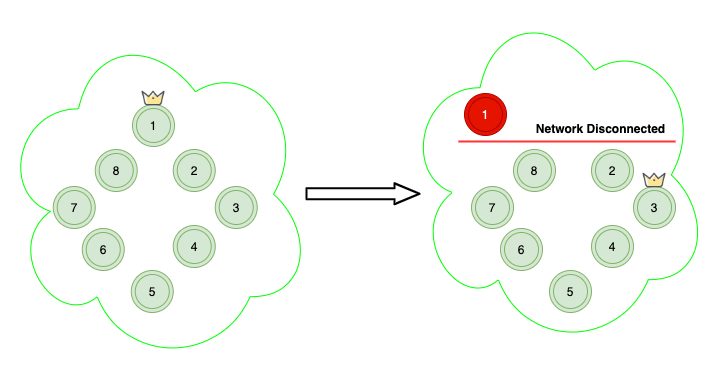
Scenario A: The cluster contains ten regular nodes. Each node can hold data and become master. The quorum is six. If the current master node fails due to a network issue, the cluster elects a new master and remains healthy.
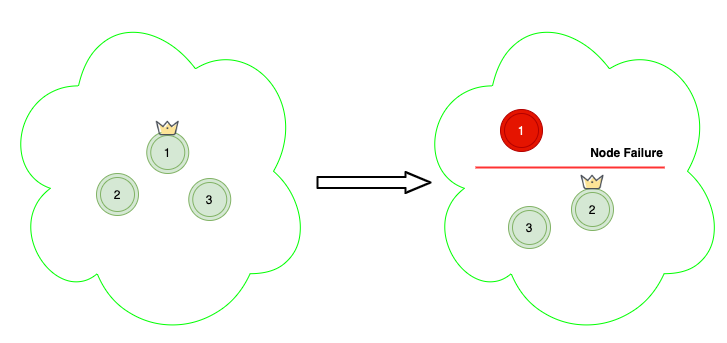
In Scenario B, the cluster consists of three dedicated master nodes and one hundred data nodes. The quorum is two. If one master node fails, the cluster elects a new master and remains operational.
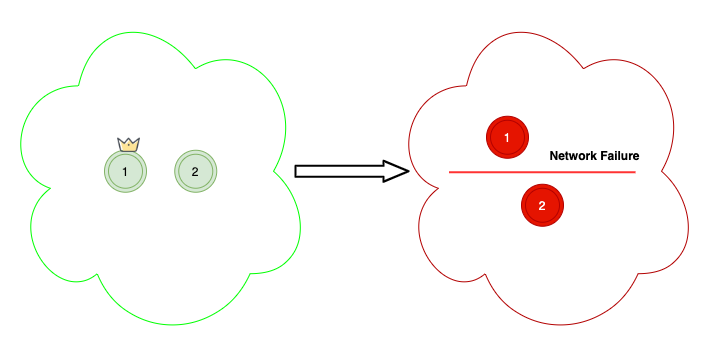
In Scenario C, the cluster has two nodes. The quorum is two. If a network failure separates the nodes, each attempts to elect itself as master. This prevents the cluster from operating.
Setting the value to one is allowed. However, this setting does not prevent data loss if the master node fails.
Note: Do not change the master node setting frequently. Frequent changes can cause cluster instability as the service adjusts the number of dedicated master nodes.
Sizing the Elasticsearch Service
Elasticsearch sizing requires an educated estimate rather than a fixed method. Key inputs include storage requirements, service usage, and Elasticsearch architecture. Use this estimate as a starting point. Validate it with representative workloads. Monitor performance.
Key sizing inputs include:
- Use case (e.g., real-time search, security monitoring, log analytics).
- Growth plans for short-term and long-term needs.
Elasticsearch scales horizontally. Poor initial indexing or sharding causes issues later. You will face approval delays to add hardware. You will underutilize infrastructure.
Three key components determine appropriate cluster settings:
- Calculate storage requirements
- Determine the number of shards
- Select instance types and validate performance
If you want help sizing a production cluster, see our Elastic search and observability services.
Calculate storage requirements
Elasticsearch stores documents in indices. Classify storage by index type:
- Growing Index: A single index receives continuous updates and inserts. The index grows over time. Determine disk usage from available data. Common use cases include document search and e-commerce search.
- Rollover Index: Write data to a temporary index based on a defined retention period. Calculate total data volume by multiplying the rate of data generation by the retention time. For example: 100 MiB of logs per hour equals 2.4 GiB per day. A 30-day retention period requires 72 GiB. Common use cases include log analytics and time-series processing.
Assess the following factors in addition to storage space:
- Replica Count: A replica is a full copy of an index. Each replica consumes disk space equal to the primary index. The default replica count is 1. Maintain a replica count of 1 to prevent data loss. Replicas also improve search performance.
- Elasticsearch reserves 5% or 10% for margin of error and 15% to remain under disk watermarks. This space supports segment merges, logs, and internal operations.
Low storage capacity frequently causes cluster instability. Verify calculations for instance types, instance counts, and storage volumes.
How Many Shards Should an Elasticsearch Index Have?
Select the appropriate indexing strategy for each index. By default, Elasticsearch divides indices into primary and replica shards. For example, an index with 2 primary shards and 1 replica shard contains 4 total shards. You cannot change the primary shard count after index creation.
Each shard consumes CPU and memory. Excessive small shards cause performance issues and out-of-memory errors. Do not create shards that are too large.
Maintain a shard size between 10 and 50 GiB.
Calculate the approximate number of shards using this formula:
01App. Number of Primary Shards = 02(Source Data + Room to Grow) * (1 + Indexing Overhead) / Desired Shard SizeOptimize shard size. It must be small enough for efficiency. It must remain large enough to prevent hardware strain.
Review this example to verify the calculation:
Scenario 1
Consider 50 GiB of static data. Apply the formula: (50 × 1.1 / 30) = 2 shards.
Assume a target shard size of 30 GiB.
Scenario 2: Projected Growth
Assume the 50 GiB grows by 4x within 12 months. Total volume reaches 200 GiB. Apply the formula: ((50 + 150) × 1.1 / 30) = 8 shards.
Provisioning for future volume prevents under-sharding. It also avoids creating numerous small shards. Small shards increase CPU and memory overhead. They degrade current performance. With 8 shards, the current per-shard size is: (50 × 1.1) / 8 = 6.86 GiB.
Current shard size is below the recommended range of 10 to 50 GiB. This size consumes excess resources. A middle-ground approach uses five shards. This size yields 11 GiB per shard now (50 * 1.1 / 5). It yields 44 GiB per shard in the future ((50 + 150) * 1.1 / 5).
Both approaches rely on approximation rather than precise sizing.
Do not use exact sizing. Exact sizing risks disk exhaustion before reaching the threshold. For example, consider a 128 GiB instance. If disk usage stays below 80% (103 GiB) and shard size is 10 GiB, the node holds approximately 10 shards.
Limit shards per node to 20 per GiB of Java heap.
Instance Type Selection and Validation:
After determining storage requirements and shard counts, select hardware. Requirements vary by workload. Instance storage limits define the CPU and memory resources available for the workload.
The following formulas guide instance type selection.
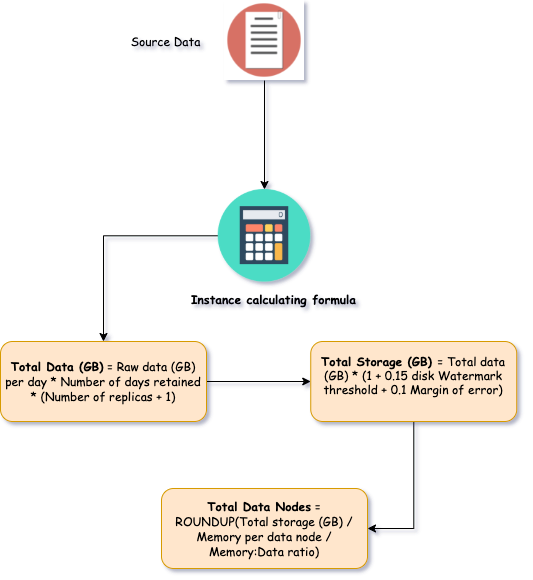
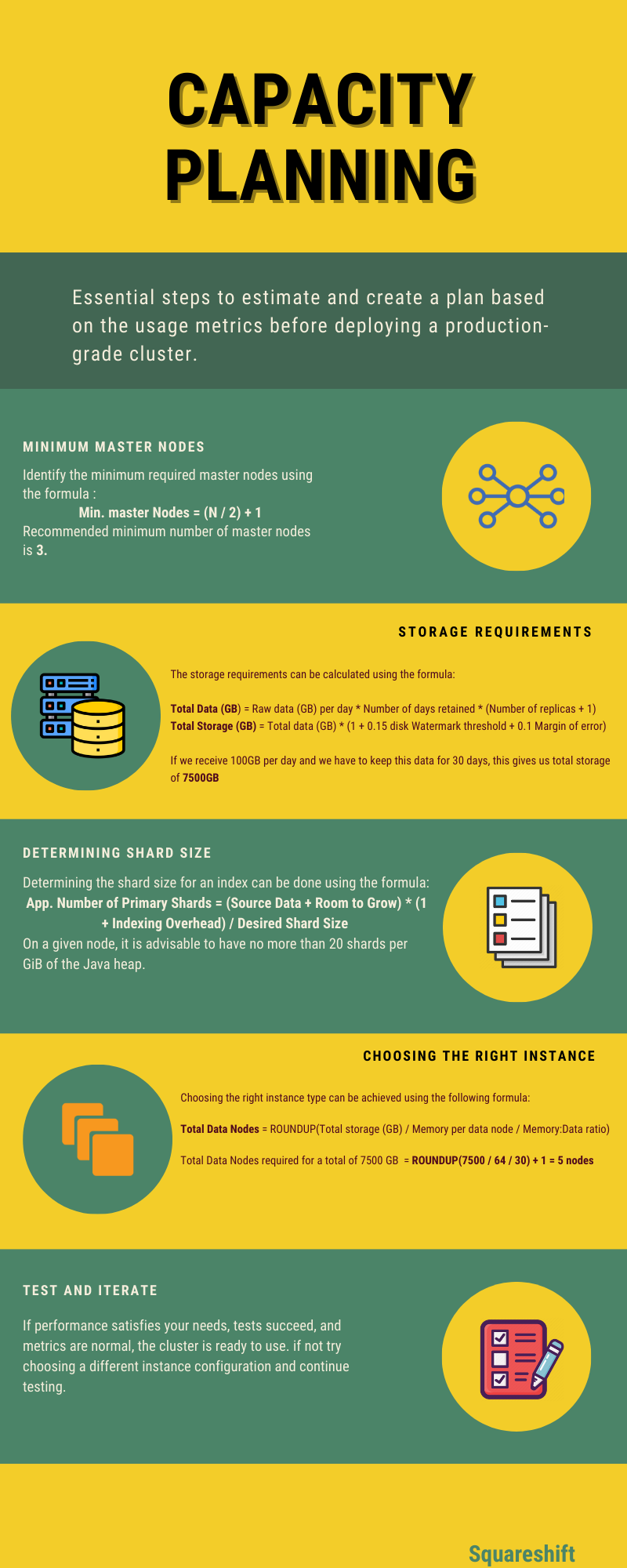
01Total Data (GB) = Raw data (GB) per day * Number of days retained * (Number of replicas + 1)01Total Storage (GB) = Total data (GB) * (1 + 0.15 disk Watermark threshold + 0.1 Margin of error)01Total Data Nodes = ROUNDUP(Total storage (GB) / Memory per data node / Memory:Data ratio)The following example illustrates these formulas.
A logging application ingests 3 GiB per day with a 90-day retention period. Use nodes with 8 GB of memory for this deployment size.
Calculate the values as follows:
Total Data (GB) = 3GB x 90 days x 2 = 540GB
Total Storage (GB) = 540GB x 1.25 = 675GB
Total Data Nodes = 675GB / (30 x 8GB) = 3 nodes
Summary of capacity calculations:
Related reading: benchmarking Elastic Cloud on AWS, GCP and Azure, how to delete an index in Elasticsearch and troubleshooting Elasticsearch errors.
Sources:
https://www.elastic.co/blog/found-sizing-elasticsearch
https://www.cncf.io/blog/2021/03/25/how-to-build-an-elastic-search-cluster-for-production/
https://docs.aws.amazon.com/elasticsearch-service/latest/developerguide/what-is-amazon-elasticsearch-service.html
https://www.elastic.co/blog/benchmarking-and-sizing-your-elasticsearch-cluster-for-logs-and-metrics