
Organizations migrating from data silos to a governed source of truth face hidden complexities that cause project failure. This article examines key challenges, including logic gaps and low user adoption. It provides a roadmap to ensure a scalable transition to modern platforms such as Looker.
The main BI migration challenges are logic gaps, legacy architecture, visualization gaps, low user adoption, and weak governance, security and testing.
1. Drivers for Enterprise BI Platform Migration
Organizations are replacing legacy BI platforms. These systems often isolate data in silos. Data remains trapped in rigid, predefined reports. These reports fail to match business speed.
Enterprises are migrating to modern solutions such as Looker. They seek a unified business view. A modern platform provides a single, governed source of truth. This replaces conflicting departmental spreadsheets. Businesses also require scalability and flexibility. Modern platforms handle large cloud-based datasets. Non-technical users can query data directly. They no longer need developers for every request. Migration shifts focus from historical analysis to predictive modeling.
2. Solutions for BI Migration Challenges and Failures
Moving from legacy BI to modern BI requires a shift from report-centric workflows to model-centric workflows. Success requires avoiding common migration errors and data migration mistakes.
SquareShift helps organizations bridge the gap between legacy complexity and Looker. We support the transition to modern analytics.
2.1 The Logic Gap: Avoiding Calculation Errors
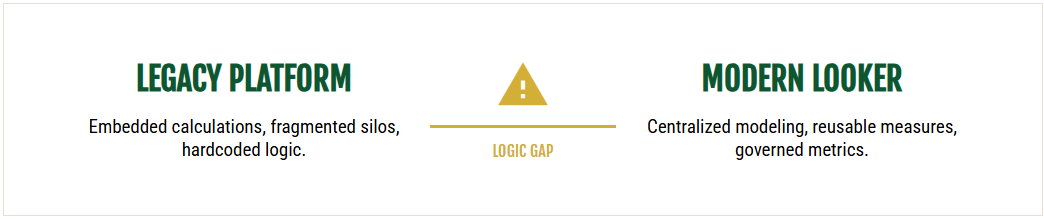
A primary challenge in BI migration is underestimating the complexity of translating business logic between systems.
Projects fail when teams migrate without a complete understanding of the source environment. This leads to errors in translating complex logic, including LOD expressions, DAX measures, and nested filters.
Prevention Strategy
- Inventory all assets. Create a complete list of dashboards, calculations, data sources, and user access levels.
- Document logic independently. Record business rules separate from the source platform implementation.
- Validate rigorously. Build test cases with expected outputs. Compare migrated calculations against source results.
2.2 Align Architecture With Future Requirements
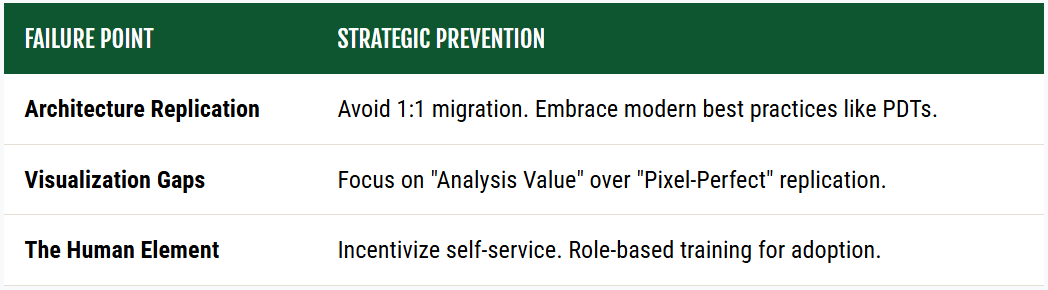
Do not replicate legacy architecture patterns. Adopt the Looker modeling approach.
Problem
Replicating old workbook structures, extract architectures, or rigid hierarchies reduces platform adoption.
Prevention Strategy
- Apply LookML best practices from the start. Use dimensions, measures, and derived tables.
- Design models around business domains. Do not replicate legacy structures.
- Optimize performance. Use Persistent Derived Tables (PDTs) and aggregate awareness.
2.3 Bridge Visualization Gaps
Legacy visualization features, such as pixel-perfect positioning, do not transfer to Looker. This creates significant migration challenges.
Challenge: Layout Compatibility
Enforcing pixel-perfect layouts or proprietary charts creates unnecessary delays and stakeholder friction.
Prevention: Functional Mapping
- Map Equivalents: Align legacy charts to Looker defaults. Use the extension framework for custom visuals.
- Prioritize Value: Preserve analytical utility over exact visual replication.
- Manage Expectations: Communicate visual differences to stakeholders early.
2.4 Human Element: Training and Adoption
Failures often occur when users accustomed to legacy platforms struggle with new data approaches.
Problem
Users may expect Excel-like formula bars or prompted delivery systems. These functions differ in Looker.
Prevention Strategy
- Pre-Migration Education: Address paradigm shifts before migration begins.
- Role-Specific Training: Define distinct tracks for viewers, explorers, developers, and administrators.
- Concurrent Support: Provide legacy-versus-Looker comparisons and maintain a dedicated support channel.
2.5 Governance, Security, and Testing Deficiencies
Rushed migrations often skip security controls and validation. This causes critical data errors.
The Problem
Skipping governance exposes data. It delays the detection of critical issues until after deployment.
Prevention Strategy
- Security Mapping: Map existing security to Looker permissions. Test row-level security thoroughly.
- Layered Testing: Run unit tests on individual fields. Run integration tests on dashboard interactions.
- User Validation: Have business users confirm outputs via User Acceptance Testing (UAT).
3. Conclusion
BI migration challenges are preventable with a structured approach. Prioritize thorough discovery. Adapt to modern BI modeling. Invest in user training. These steps prevent data migration failures. This approach respects migration complexity. It empowers every user with a single, reliable source of truth.
SquareShift accelerates BI migrations. We bridge the gap between legacy systems and modern BI standards.
Schedule a Tableau to Looker migration consultation with SquareShift
Related guides: common challenges in Tableau to Looker migration and data integrity in Tableau to Looker migration.
FAQs
Frequently Asked Questions
Q: How do you prevent data corruption during migration?
- Adopt a governed, model-centric approach.
- Document business logic independently.
- Validate migrated calculations against source results.
Q: What are common BI migration challenges?
- Underestimating business logic complexity.
- Replicating legacy architectures.
- Visualization gaps.
- Low user adoption.
Q: What is the logic gap in BI migration?
- The complexity of translating business logic, such as DAX measures or nested filters, from legacy to new systems.
Q: Why avoid replicating legacy architecture in Looker?
- Legacy structures cause poor performance and low adoption.
- Use LookML best practices, such as dimensions and measures.
Q: How do you prevent technical errors during migration?
- Use a structured approach.
- Conduct thorough inventory.
- Document logic independently.
- Validate results rigorously.
Q: How long does a typical BI migration to Looker take?
- Typical timelines span several months.
- SquareShift reduces this to weeks using the proprietary Migration Accelerator.
- This AI-powered tool automates up to 80% of manual effort, including LookML code conversion and logic translation.
- This approach delivers accurate transitions with 50% lower costs.
Q: Why do BI migrations fail?
Organizations migrating from data silos to a governed source of truth face hidden complexities. Projects fail when teams migrate without a full understanding of the source environment, replicate legacy architecture, hit visualization gaps, skip security controls and testing, or ignore the training needs of users accustomed to legacy platforms.
Q: How do you handle visualization gaps in a BI migration?
Legacy features such as pixel-perfect positioning do not transfer to Looker. Map legacy charts to Looker defaults and use the extension framework for custom visuals. Prioritize analytical utility over exact visual replication, and communicate visual differences to stakeholders early. Enforcing pixel-perfect layouts creates unnecessary delays and stakeholder friction.
Q: How should you test a BI migration?
Map existing security to Looker permissions and test row-level security thoroughly. Run unit tests on individual fields and integration tests on dashboard interactions. Have business users confirm outputs through User Acceptance Testing. Rushed migrations often skip security controls and validation, which causes critical data errors.