
This guide details conversational analytics in Looker. It covers architecture, governance, and adoption. The content helps organizations define data access standards and manage natural language interfaces.
Conversational analytics converts plain text queries into structured data. Looker integrates this feature with its semantic layer. This maintains data consistency. It aligns responses with established business definitions.
1. Definition of Conversational Analytics in Looker
2. The Value of Conversational Analytics
3. Deployment Requirements
4. Conversational Analytics Architecture in Looker
4.1 Query Processing Workflow
4.2 System Architecture
4.3 Data Agents in AI-Driven Analytics
4.4 Conversational Analytics in Slack, Teams, and Embedded Apps
4.5 Positioning Looker and Looker Studio for Conversational BI
5. Applications Across Business Functions
6. Security and Governance
7. Limitations and Practical Expectations
8. SquareShift Conversational Analytics Solutions
9. Conclusion
1. Definition of Conversational Analytics in Looker
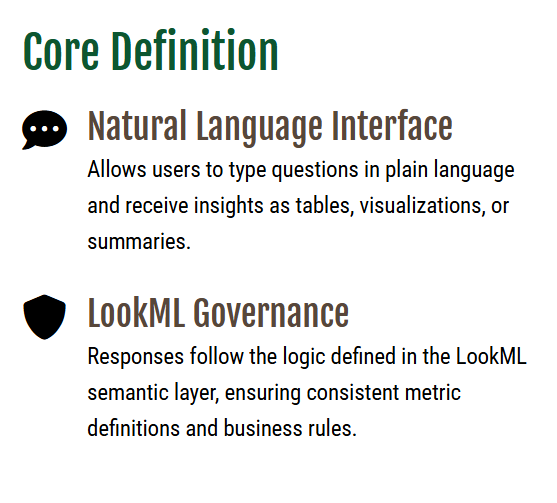
Conversational analytics in Looker is a natural language interface. Users type questions and receive tables, visualizations, or summaries. Responses follow LookML logic. This ensures consistent metric definitions and business rules. The interface maintains conversational context. Users can drill down into Looker Explores for additional detail.
2. Why Conversational Analytics Delivers Value
Conversational analytics shortens the path to insight. It reduces the steps required to query data. It serves non-technical users who lack SQL skills. It frees analysts from routine questions.
The LookML model aligns results with established definitions. This maintains data reliability. It supports consistent outputs as access expands.
Organizations often pair conversational analytics with broader BI modernization. Teams evaluate how Looker supports scalable analytics foundations. They integrate natural language access with existing infrastructure.
3. Prerequisites for Deployment

Establish these prerequisites before enabling conversational analytics.
- Define clear metrics.Ensure the LookML semantic layer contains accurate measures and dimensions. Conversational responses derive from these definitions.
- Structure relevant Explores.Users query these models for conversational insights. Keep Explores organized and aligned with business needs.
- Maintain stable joins and relationships.Clean data relationships prevent errors in multi-table queries.
- Configure user permissions.Row level security, folder access, and user attributes control data visibility. Conversational analytics enforces these settings.
These prerequisites ensure predictable behavior in conversational analytics.
4. How Conversational Analytics Functions in Looker
When a user submits a question:
- Looker identifies fields, measures, and filters from the LookML model and Data Agent instructions.
- Looker generates and executes the query on the connected database.
- The interface formats the result.
- Looker retains session context to allow question refinement.
Users can open the associated Explore for deeper analysis. This allows switching between conversational and traditional analytical modes.
4.1 Workflow: Query Processing in Looker
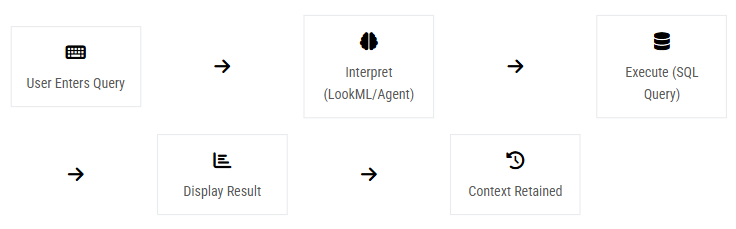
A conversational query follows this sequence:
- The user enters a natural language question.
- Looker interprets the query using the semantic layer.
- Data Agent instructions define field selection and filtering.
- Looker builds the underlying query.
- The database runs the query.
- The system returns results. It displays them as a chart, table, or summary.
- The system keeps conversation context. It supports follow-up questions.
- The user can open the linked Explore. This extends the analysis.
This workflow controls the interaction. It keeps results consistent and governed.
4.2 System Architecture
The Looker conversational analytics system consists of three core components.
- Interface: Users input queries via Looker, Slack, or Teams.
- Semantic Layer: LookML defines metrics and relationships for query interpretation.
- Data Agents: Agents apply domain-specific instructions to refine interpretation.
- Database LayerLooker generates SQL from the user query and executes it against the analytical warehouse.
- Optional MCP LayerIf AI tools such as Gemini or Claude are present, the Model Context Protocol connects the AI client to Looker. The MCP server sends instructions to Looker and returns results to the AI client.
This modular architecture enables governed conversational analytics across environments.
4.3 Data Agents in AI-Driven Looker Analytics
Data Agents define how Looker interprets conversational input. They align business language with LookML model terms. If users use different names for locations than the technical field name, a Data Agent maps the conversational term to the correct dimension.
Data Agents support configuration for preferred fields, default filters, and grouping logic. These rules shape query construction during minimal user input. This approach increases query reliability and context awareness.
Sharing Data Agents preserves the underlying access model. Shared users retain their original permissions and do not gain access to additional data. Agent instructions remain private to the owner. This structure maintains governance while enabling wider adoption.
To review the broader impact of AI-driven analytics on business decisions, consult our analysis of AI-driven analytics in Looker.
4.4 Conversational Analytics in Slack, Microsoft Teams, and Embedded Applications
Conversational analytics extends beyond the Looker interface. Organizations often require data access within collaboration platforms such as Slack and Microsoft Teams. Looker supports this workflow through its agent-based architecture.
The agent receives user input via the communication platform. It interprets the request and executes the query in Looker. The system returns the result to the original channel. Looker governance, permissions, and user attributes remain active. The agent queries Looker on behalf of the user.
Agentic BI supports interactions from Slack and other applications. It connects to multiple enterprise systems. It performs actions using role-based access to various data sources.
4.5 Context for Looker and Looker Studio in Conversational BI Solutions
Looker and Looker Studio provide conversational interfaces. They operate with different architectures.
Looker uses its semantic layer to interpret conversational queries. This ensures consistent definitions and calculations. Consistency applies to dashboards, Explores, and conversational responses.
Looker Studio connects to diverse data sources, including Looker Explores, BigQuery tables, Google Sheets, and CSV files. This access provides flexibility. It does not enforce semantic governance. Organizations select a tool based on their need for consistency and oversight.
5. Use Cases Across Business Functions
Conversational analytics supports routine analytical tasks.
- Marketing teams query campaign performance, channel trends, and audience behavior during planning and review sessions.
- Ecommerce managers request sales data, product metrics, and daily trends without waiting for dashboard updates.
- Operations. Operational leads can query delays, workload distribution, or exceptions during coordination activities.
- Finance. Users can access expense, revenue, or cost summaries during review cycles.
- SaaS and Multi-Tenant Environments. Looker enforces tenant isolation via user attributes and row-level security. Conversational analytics adheres to these rules. It returns only authorized data. This is critical for platforms embedding Looker.
These cases show that conversational analytics reduces friction. It does not replace dashboards.
More examples are in our guide to practical use cases for conversational analytics in Looker and our post on how business users access data faster with natural language query in Looker.
6. Security and Governance Considerations
Looker applies standard governance controls to conversational analytics. These controls align with platform-wide security settings.
These controls include:
- Row-level security: Looker limits results based on user attributes in the Admin panel. Groups receive specific values. LookML Explore filters enforce these rules.
- Folder and content permissions: Users access only approved content. Folder-level settings define available dashboards, Looks, and Explores.
- Explore-level permissions: Organizations restrict user access to specific Explores. If a user lacks access, conversational answers from that Explore do not appear.
- Tenant-level isolation: User attributes define the tenant identifier. LookML references these attributes to scope all queries to the correct tenant. BigQuery connections are configured per tenant.
This model secures conversational analytics and ensures compliance.
7. Limitations and Practical Expectations
Conversational analytics provides convenience but does not replace all analytical workflows. Effectiveness depends on these conditions:
- The LookML model is consistent, accurate, and well defined.
- Ambiguous queries require users to refine their input.
- Data Agents support interpretation but do not resolve modeling errors.
- Dashboards or SQL serve complex analytical workflows better.
- Looker Explores drive conversational analytics in Looker, limiting specific exploration scenarios.
Acknowledging these constraints supports effective deployment.
8. SquareShift Conversational Analytics Services
SquareShift delivers structured programs for SMEs to adopt conversational analytics with clarity and control.
BI Conversations Program
The program follows a defined sequence: discovery, data quality checks, and model curation. It proceeds to Data Agent configuration, testing, and rollout. This process creates a dataset ready for conversation, supporting accurate and consistent interactions.
Agentic BI Program
This program defines an automated analytical workflow. It performs the following actions:
- Prepares the semantic layer
- Identifies and implements required agents using Vertex AI
- Integrates the Conversational Analytics API for multi-step functionality
Both programs support stable and predictable deployment. View our conversational analytics offering for Looker to see the full service and deployment options.
9. Conclusion
Conversational analytics in Looker enables users to query data using natural language. It provides the following capabilities:
- Builds on the LookML semantic layer
- Ensures consistent metric interpretation
- Operates reliably across Looker, collaboration platforms, and AI-assisted workflows
Organizations benefit most from conversational analytics when they implement:
- Well-defined models
- Appropriate security controls
- A structured rollout plan
These foundations provide teams with stable access to data without increasing analytical complexity.
SquareShift enables this shift. We prepare the semantic layer, refine conversational datasets, and introduce agent-driven interactions in a structured, reliable manner. This approach provides a practical path for adopting conversational analytics. It aligns with enterprise requirements and Looker's direction toward agent-supported analysis.
FAQ
Frequently Asked Questions
Q: What is conversational analytics in Looker?
Conversational analytics in Looker allows users to ask questions in plain language.
- Users receive insights as charts, tables, or summaries.
- The system uses the LookML semantic layer.
- This layer ensures consistent metrics and business rules.
- The result is reliable, governed access to critical data.
- This supports faster decision-making.
Q: How does Looker handle natural language queries?
- Looker interprets typed questions using the semantic layer.
- It applies optional Data Agent rules.
- The system generates and executes a SQL query.
- Looker returns results and maintains conversational context for follow-ups.
- Answers remain accurate, consistent, and aligned with organizational definitions.
Q: Do I need technical skills to use conversational analytics in Looker?
- No, not necessarily.
- Conversational analytics serves business users and analysts.
- Users do not need SQL knowledge to ask questions.
- A well-structured LookML model ensures accurate results.
- Non-technical users can explore data confidently.
- They can make informed decisions without relying on data engineers.
Q: Can conversational analytics work in Slack, Teams, or other apps?
- Yes.
- Looker supports conversational BI through integrated agents in Slack or Microsoft Teams.
- Security rules and permissions remain intact.
- Users access insights via natural language within collaboration tools.
- This makes analysis faster and more seamless across teams.
Q: What are the prerequisites for successful deployment?
- Define clear metrics.
- Organize Explores.
- Stabilize table relationships.
- Set proper user permissions.
- These foundations ensure reliable, predictable answers.
- They reduce errors and simplify adoption.
- They create a smooth user experience across business functions.
Q: What are the limitations of conversational analytics in Looker?
- Conversational analytics is convenient but not a replacement for all workflows.
- Ambiguous questions may require clarification.
- Complex analyses may need dashboards or SQL.
- Results depend on accurate LookML models and Data Agent configuration.
- Understand boundaries to maximize value and avoid reliance for highly complex analytics.
Q: How can SquareShift help with conversational analytics in Looker?
- SquareShift prepares the semantic layer.
- It configures Data Agents.
- It supports structured rollout through conversational and agent-based programs.
Q: Can SquareShift support AI-assisted or multi-agent workflows in Looker?
- Yes.
- SquareShift implements agent-driven architectures.
- These architectures use Vertex AI and the Conversational Analytics API for multi-step analytical tasks.
Q: What are Data Agents in Looker conversational analytics?
Data Agents define how Looker interprets conversational input. They map business language to LookML model terms, so a conversational term for a location maps to the correct dimension. They support preferred fields, default filters and grouping logic. Sharing a Data Agent keeps the underlying access model, so shared users do not gain extra data access.
Q: Is conversational analytics in Looker secure?
Looker applies its standard governance controls to conversational analytics. These include row-level security based on user attributes, folder and content permissions, Explore-level permissions and tenant-level isolation. If a user lacks access to an Explore, conversational answers from that Explore do not appear. Looker permissions and user attributes stay active in Slack and Microsoft Teams too.
Q: What is the difference between Looker and Looker Studio for conversational BI?
Both provide conversational interfaces, with different architectures. Looker uses its semantic layer to interpret queries, so definitions stay consistent across dashboards, Explores and conversational responses. Looker Studio connects to sources such as Looker Explores, BigQuery tables, Google Sheets and CSV files. That gives flexibility but does not enforce semantic governance.