
Part I described query structures for varying complexity. This article focuses on the explain API. This tool identifies efficient queries and clarifies Elasticsearch scoring internals.
After reading this article, readers will be able to:
- Interpret key metrics in explain API output.
- Define Elasticsearch scoring mechanics
- Use the Explain API to build queries from simple to complex
- Refine queries using Explain API metrics
Summary
Part I created a book catalogue for users to search for relevant titles based on specific criteria.
The following table shows sample book records.
0102{03 "title": "Designing Hard Software",04 "isbn": "133046192",05 "pageCount": 350,06 "publishedDate": "1997-02-01T00:00:00.000-0800",07 "shortDescription": "\"This book is well written ... The author does not fear to be controversial. In doing so, he writes a coherent book.\" --Dr. Frank J. van der Linden, Phillips Research Laboratories",08 "longDescription": "Have you ever heard, \"I can't define a good design but I know one when I see it\" Designing Hard Software discusses ways to develop software system designs that have the same tangibility and visibility as designs for hard objects like buildings or computer hardware. It emphasizes steps called \"essential tasks\" which result in software specifications that show how each requirement, including robustness and extensibility, will be satisfied. All software developers and managers seeking to develop \"hard\" software will benefit from these ideas. There are six essential tasks necessary for a good design: User (run-time) requirements Development sponsor (build-time) requirements Domain information Behavior identification and allocation Behavior description Software system architecture Designing Hard Software goes beyond the standard software development methodologies such as those by Booch, Rumbaugh, Yourdon, and others, by providing techniques for a complete system architecture as well as explicit measures of the goodness of design. So, \"you define a good design.\"",09 "status": "PUBLISH",10 "authors": [11 "Douglas W. Bennett"12 ],13 "categories": [14 "Object-Oriented Programming",15 "S"16 ]17}Note: The example records are available at the provided link.
The mapping for the book index is defined below.
01PUT books02{03 "mappings": {04 "properties": {05 "categories": {06 "type": "text",07 "fields": {08 "keyword": {09 "type": "keyword"10 }11 }12 },13 "longDescription": {14 "type": "text"15 },16 "shortDescription": {17 "type": "text"18 }19 }20 }21}Note: Mappings apply only to searchable fields.
How Elasticsearch Scoring Works: The BM25 Algorithm
Elasticsearch changed the default similarity algorithm from TF-IDF to BM25 in Lucene 6.
For a query Q with terms q1 to qn, the BM25 score is:
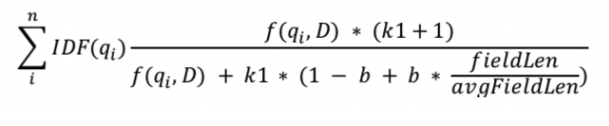
Variables:
- f(qᵢ, D): Term frequency of qᵢ in document D
- | fieldLen |: Document length in words
- k1: A parameter that controls term frequency saturation. The default value is 1.2. This value limits the impact of a single query term on the document score.
- b: A parameter for length normalization. A higher value increases the weight of document length relative to the average length. The default value is 0.75.
- avgFieldLen: The average number of terms in a document within the text collection.
- IDF: Inverse document frequency, defined as:
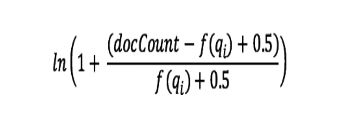
- f(qᵢ): The count of documents that contain the term qᵢ.
- docCount: The total count of documents in the collection.
Tf (term frequency) calculates term frequency using the following formula:
01freq / (freq + k1 * (1 — b + b * fieldLen / avgFieldLen))For details on the BM25 algorithm and variables, see:
- https://www.elastic.co/elasticon/conf/2016/sf/improved-text-scoring-with-bm25
- https://www.elastic.co/blog/practical-bm25-part-2-the-bm25-algorithm-and-its-variables
Search Process:
This section continues the previous article. We search the 'books' index for the term 'Open Source'. The query targets three fields: 'categories', 'longDescription', and 'shortDescription'.
01GET books/_search02{03 "query": {04 "bool": {05 "should": [06 {07 "multi_match": {08 "query": "Open Source",09 "fields": [10 "shortDescription",11 "longDescription",12 "categories.keyword"13 ],14 "type": "phrase"15 }16 }17 ]18 }19 },20 "highlight": {21 "fields": {22 "shortDescription": {},23 "longDescription": {},24 "categories.keyword": {}25 }26 }27}The query returns 36 matched documents with a max_score of 8.118633.
Sample Response:
01{02 "took": 746,03 "timed_out": false,04 "_shards": {05 "total": 1,06 "successful": 1,07 "skipped": 0,08 "failed": 009 },10 "hits": {11 "total": {12 "value": 36,13 "relation": "eq"14 },15 "max_score": 8.118633,16 "hits": [17 {18 "_index": "books",19 "_type": "_doc",20 "_id": "TjEgUYABjdRWGf7Bqv0J",21 "_score": 8.118633,22 "_source": {23 "title": "Subversion in Action",24 "isbn": "1932394478",25 "pageCount": 356,26 "publishedDate": "2004-12-01T00:00:00.000-0800",27 "thumbnailUrl": "https://s3.amazonaws.com/AKIAJC5RLADLUMVRPFDQ.book-thumb-images/machols.jpg",28 "shortDescription": "Learn all about this new open source version control application and why it is replacing CVS as the standard. Examples demonstrate how to customize features to deal with day-to-day problems.",29 "longDescription": "A new-generation version control tool, Subversion is replacing..",30 "status": "PUBLISH",31 "authors": [32 "Jeffrey Machols"33 ],34 "categories": [35 "Java"36 ]37 },38 "highlight": {39 "longDescription": [40 "A new-generation version control tool, Subversion is replacing the current <em>open</em> <em>source</em> standard, CVS."41 ],42 "shortDescription": [43 "Learn all about this new <em>open</em> <em>source</em> version control application and why it is replacing CVS as the standard"44 ]45 }46 }47 ...48 ]49 }50}We analyze result ranking to understand scoring. Adding "explain": true to the search query provides detailed scoring information for each result.
01GET books/_search02{03 "explain": true,04 "query": {05 "bool": {06 "should": [07 {08 "multi_match": {09 "query": "Open Source",10 "fields": []11 }12 },13 ...14 ]15 }16 }17}The following output shows the search results and explanations. The response structure is standard. Later sections explain the logic.
01"_explanation": {02 "value": 8.118633,03 "description": "max of:",04 "details": [05 {06 "value": 3.591908,07 "description": """weight(longDescription:"open source" in 152) [PerFieldSimilarity], result of:""",08 "details": [09 {10 "value": 3.591908,11 "description": "score(freq=1.0), computed as boost * idf * tf from:",12 "details": [13 {14 "value": 2.2,15 "description": "boost",16 "details": []17 },18 {19 "value": 3.1677296,20 "description": "idf, sum of:",21 "details": [22 {23 "value": 1.7381384,24 "description": "idf, computed as log(1 + (N - n + 0.5) / (n + 0.5)) from:",25 "details": [26 {27 "value": 41,28 "description": "n, number of documents containing term",29 "details": []30 },31 {32 "value": 235,33 "description": "N, total number of documents with field",34 "details": []35 }36 ]37 },38 {39 "value": 1.4295912,40 "description": "idf, computed as log(1 + (N - n + 0.5) / (n + 0.5)) from:",41 "details": [42 {43 "value": 56,44 "description": "n, number of documents containing term",45 "details": []46 },47 {48 "value": 235,49 "description": "N, total number of documents with field",50 "details": []51 }52 ]53 }54 ]55 },56 {57 "value": 0.51541185,58 "description": "tf, computed as freq / (freq + k1 * (1 - b + b * dl / avgdl)) from:",59 "details": [60 {61 "value": 1.0,62 "description": "phraseFreq=1.0",63 "details": []64 },65 {66 "value": 1.2,67 "description": "k1, term saturation parameter",68 "details": []69 },70 {71 "value": 0.75,72 "description": "b, length normalization parameter",73 "details": []74 },75 {76 "value": 136.0,77 "description": "dl, length of field (approximate)",78 "details": []79 },80 {81 "value": 191.19148,82 "description": "avgdl, average length of field",83 "details": []84 }85 ]86 }87 ]88 }89 ]90 },91 {92 "value": 8.118633,93 "description": """weight(shortDescription:"open source" in 152) [PerFieldSimilarity], result of:""",94 "details": [95 {96 "value": 8.118633,97 "description": "score(freq=1.0), computed as boost * idf * tf from:",98 "details": [99 {100 "value": 2.2,101 "description": "boost",102 "details": []103 },104 {105 "value": 6.77204,106 "description": "idf, sum of:",107 "details": [108 {109 "scoring": "omitted for brevity"110 }111 ]112 },113 {114 "value": 0.54493,115 "description": "tf, computed as freq / (freq + k1 * (1 - b + b * dl / avgdl)) from:",116 "details": [117 {118 "scoring": "omitted for brevity"119 }120 ]121 }122 ]123 }124 ]125 }126 ]127}Reading Scoring Logic with the Explain API
This section explains how the scoring engine calculates relevance.
Examine the first document (ISBN: 1932394478) from the previous search. The explanation shows the term “Open Source” matched in the longDescription and shortDescription fields.
Consider the following:
01 tf = freq / (freq + k₁ * (1 — b + b * fieldLen / avgFieldLen))For the document with ISBN 1932394478, the PerFieldSimilarity for the phrase "Open Source" in the longDescription field is:
1. freq = 1. The phrase "Open Source" appears once in this document.
2. k1 = 1.2. This is the default value.
3. b = 0.75. This is the default value.
4. dl = 32. The longDescription field contains 32 words in this document.
5. avgdl = 53.82192. This value represents the average length of the longDescription field in shard [books][0].
Substitute the values into the formula. The result is tf = 0.51541185.
Use tf to calculate the idf (Inverse Document Frequency) using the following formula:
01 idf = log(1 + (N — n + 0.5) / (n + 0.5))For the term Open, N = 235 and n = 41 in shard [books][0]. The result is idf = 1.7381384.
For the term Source, N = 235 and n = 56 in shard [books][0]. The result is idf = 1.4295912.
The IDF value is 3.1677296.
The default boost score is 2.2. This value equals (k1 + 1), per the BM25 formula.
The final score for this search phrase in longDescription is:
01 tf * idf * (k1+1) = 0.51541185 * 3.1677296 * 2.2 = 3.591908The system calculates scores for each field in the search parameters. The score for shortDescription is:
01 tf * idf * (k1+1) = 0.54493 * 6.77204 * 2.2 = 8.118633When using the phrase type, the result takes the maximum score from all fields. It returns the document with the highest score.
Field Boosting
Boosting changes the weight of specific fields in the scoring algorithm. Use this feature to prioritize fields that have higher relevance to the user query.
Apply a boost to the categories field to observe the change in search results.
01GET books/_search02{03 "query": {04 "bool": {05 "should": [06 {07 "multi_match": {08 "query": "Open Source",09 "fields": [10 "shortDescription",11 "longDescription",12 "categories.keyword^50"13 ],14 "type": "phrase"15 }16 }17 ]18 }19 },20 "highlight": {21 "fields": {22 "shortDescription": {},23 "longDescription": {},24 "categories.keyword": {}25 }26 }27}Sample Response
01{02 "took": 15,03 "timed_out": false,04 "_shards": {05 "total": 1,06 "successful": 1,07 "skipped": 0,08 "failed": 009 },10 "hits": {11 "total": {12 "value": 36,13 "relation": "eq"14 },15 "max_score": 250.57788,16 "hits": [17 {18 "_index": "books",19 "_type": "_doc",20 "_id": "tjEgUYABjdRWGf7BqvwI",21 "_score": 250.57788,22 "_source": {23 "title": "Unlocking Android",24 "isbn": "1933988673",25 "pageCount": 416,26 "publishedDate": "2009-04-01T00:00:00.000-0700", 27 ...28 ]29 }30} The final score is 250.57788, calculated as the original score multiplied by the boost value. The ranking differs from the previous query because boosting changes the relevance scores.
Use this configuration to increase the relevance weight of specific fields in search results.
Expand Query Scope
Previous sections focus on exact phrase matching. Use partial matching to return documents with incomplete query terms.
01GET books/_search02{03 "explain": true,04 "query": {05 "bool": {06 "should": [07 {08 "multi_match": {09 "query": "Open Source",10 "fields": [11 "shortDescription",12 "longDescription",13 "categories.keyword^50"14 ],15 "type": "phrase"16 }17 },18 {19 "multi_match": {20 "query": "Open Source",21 "fields": [22 "shortDescription",23 "longDescription",24 "categories^40"25 ],26 "type": "most_fields"27 }28 }29 ]30 }31 },32 "highlight": {33 "fields": {34 "shortDescription": {},35 "longDescription": {},36 "categories": {},37 "categories.keyword": {}38 }39 }40}Sample Response
01{02 "took": 27,03 "timed_out": false,04 "_shards": {05 "total": 1,06 "successful": 1,07 "skipped": 0,08 "failed": 009 },10 "hits": {11 "total": {12 "value": 61,13 "relation": "eq"14 },15 "max_score": 530.05334,16 "hits": [17 {18 "_shard": "[books][0]",19 "_node": "PiILupiCSs21etzGXXfN0g",20 "_index": "books",21 "_type": "_doc",22 "_id": "ETEgUYABjdRWGf7Bqv0J",23 "_score": 530.05334,24 "_source": {25 "title": "Lucene in Action, Second Edition",26 "isbn": "1933988177",27 ...28 ]29 }30}The highest score is 530.05334 for the document with ISBN 1933988177.
Query results depend on the selected type. Understand each type before writing complex queries.
For example, using best_fields instead of most_fields returns the document with ISBN 1933988673.
best_fields uses the maximum score from a single field. most_fields combines scores from multiple fields.
Review the following link for multi-match types:
- https://www.elastic.co/guide/en/elasticsearch/reference/current/query-dsl-multi-match-query.html#multi-match-types
Summary
Writing search queries requires discipline. Understanding scoring mechanics enables precise result sets.
Key rules for query construction:
Step 1 — Define Requirements. Identify the expected search output.
Step 2 — Plan. Select the target fields for the query.
Step 3 — Boosting: Assign higher preference to specific fields using the boost parameter. Select boost values carefully. High values may degrade result accuracy.
Step 4 — Writing the Query: Construct the final query. Apply the parameters defined in Steps 1 through 3.
Step 5 — Explain API: Use the explain API. Analyze scoring logic. Identify necessary adjustments.
Step 6 — Repeat: If results do not meet requirements, return to Step 2. Repeat the process until the expected ranking is achieved.
Select a sample dataset to test this workflow. Verify that the ranking and search results meet requirements.
This two-part series explains search query construction and the Elasticsearch internal scoring algorithm.
Apply the following guidelines when developing search queries:
- Keyword fields do not support partial matches and may degrade result quality. Use keyword fields only when searching for exact, single-word matches.
- Keyword fields require unique values. Excessive use of keyword fields can produce inaccurate search results.
- Boost fields only when necessary. Excessive boosting may produce undesired results.
- Select field types in match queries based on specific search requirements.
- Filter data first. Then, execute the search operation.
- Use function score to decay the relevance score of older documents.
For help improving search relevance, see AI-powered search with Elasticsearch.
Related reading: Part 1 on Elasticsearch query optimisation and hybrid keyword and vector search in Elastic vs Weaviate.
References
https://www.elastic.co/guide/en/elasticsearch/reference/current/search-explain.html