
Previous Article Summary
The previous article detailed the creation of a healthcare appointment scheduling agent using Vertex AI Agent Builder. The agent handled basic queries and guided users through booking. This article extends the agent to query real-time doctor availability and schedule appointments without human intervention by integrating live APIs.
API Integration for AI Agent Functionality
APIs serve as the interface layer for modern applications. Integrating them into AI agents connects agents to live data streams, services, and databases. This enables precise execution of complex tasks.
APIs allow your agent to:
- Interact in real time: Query physician availability, book appointments, and monitor cancellations as they occur.
- Execute actions: Perform operations, such as confirming appointments, without manual intervention.
- Personalize experiences: Generate tailored responses based on live data for each interaction.
Process: Integrate External APIs in Vertex AI Agent Builder
- Prepare the API
- Prepare the target API before integration. This API acts as the interface between the agent and external systems. It enables the agent to retrieve real-time data and execute actions, such as booking appointments.
- Access the Tools Section
- Open the Agent Builder Console.
- In the Agent Builder Console, open the Tools section. Click the tool icon.
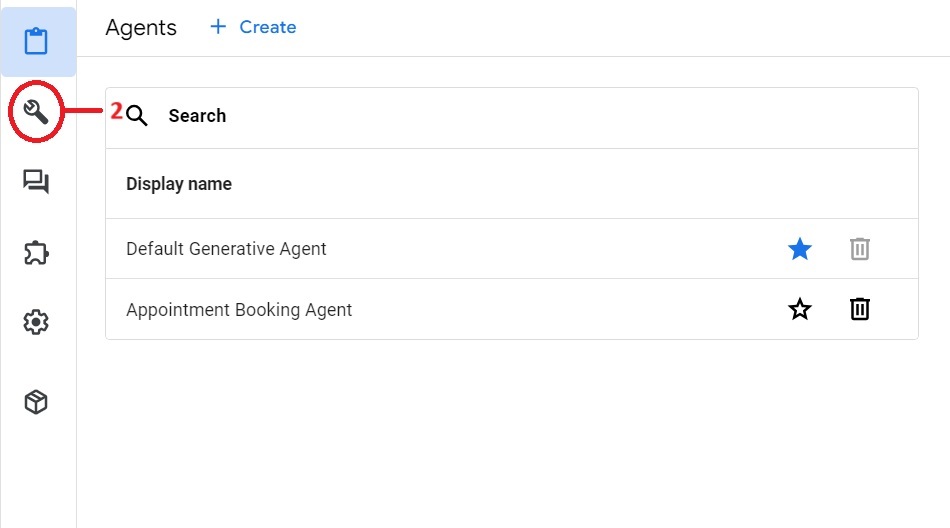
- Start tool creation
- Click Create. The system opens the tool creation window.
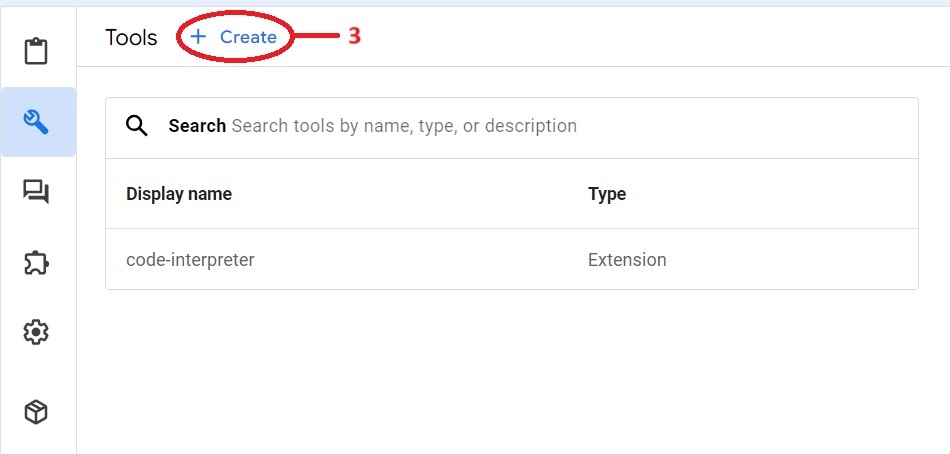
- Set tool type and purpose
- Select OpenAPI as the tool type. This defines the API using an OpenAPI schema.
- Assign a clear name and description to the API tool. These fields define the tool purpose and function for user review.
- Create the OpenAPI Schema
- Define the API structure in JSON or YAML. Include the following elements:
- Endpoints: List the available API routes.
- Operations: Identify supported methods (GET, POST).
- Parameters: Specify required input fields, data types, and constraints.
- Responses: Detail expected outputs for success and error states.
- Consult the OpenAPI Specification for syntax details. Ensure the schema matches the target API, including authentication and response formats.
- Save the Tool
- Save the schema after review. The agent can now access the API.
- Reference ${TOOL: Tool_Name} in the instruction to use this tool.
The agent can now access live data and execute API actions. This integration improves functionality and user experience for appointment scheduling.
Conclusion: Convert Static Agents into Dynamic Problem Solvers
API integration enables real-time, dynamic responses. The agent handles live data for healthcare appointments and other tasks, improving user experience.
See our agentic workflows service for production use of agents like this one.
The next article details document search using datastore. This method improves knowledge retrieval accuracy.
Start with the healthcare appointment scheduling agent from the previous article, then see how to add datastores to Vertex AI agents.